How to Create and Optimize a LinkedIn Company Page for Employer Branding

Are You Hiring?
Find candidates in 72 Hours with 5+ million talents in Maukerja Malaysia & Ricebowl using Job Ads.
Hire Now
In today’s digital hiring landscape, having a professional online presence is no longer optional.
Many candidates, clients, and business partners check a company’s LinkedIn company page before engaging further. It has become one of the first places people look to understand what a company does, how it operates, and what kind of culture it promotes.
A well-managed LinkedIn company page supports employer branding, recruitment efforts, and business networking. It allows organisations to showcase their values, highlight achievements, share updates, and attract talent in a competitive job market. When built and optimised properly, a LinkedIn company page becomes a powerful tool for strengthening credibility and building long-term professional relationships.
Why HR & Companies Should Have a LinkedIn Company Page
A LinkedIn company page offers several practical benefits.
Promotes Employer Brand
Candidates often check a company’s LinkedIn page before applying to check the credibility of the company. So, having a complete and active page builds trust and shows professionalism.
Supports Talent Acquisition
The LinkedIn Career Page feature allows companies to highlight job openings and culture in a structured way. It helps HR teams attract candidates who align with the company's values and work style.
Showcases Company Culture and Values
The “Life” tab within LinkedIn Career Page allows companies to share employee stories, photos, and team insights. Candidates can get a clearer picture of what working in the company looks like.
Shares Updates and Achievements
Company updates can include:
-
Milestones
-
Awards
-
New product launches
-
CSR activities
-
Leadership insights
Regular updates improve visibility and engagement.
Connects with Stakeholders
A LinkedIn company page helps connect with:
-
Business partners
-
Clients
-
Investors
-
Industry professionals
Buyers are more likely to trust brands they engage with on LinkedIn.
Improves Online Presence and Credibility
A complete page with logo, banner, description, and active content builds professional credibility.
LinkedIn vs Personal Profile
HR and management should understand the difference of this two.
Personal LinkedIn Profile
-
Represents an individual
-
Used for personal branding
-
Highlights personal experience, skills, and achievements
LinkedIn Company Page
-
Represents an organisation
-
Showcases company identity
-
Managed by page administrators
-
Used for employer branding, recruitment, and business communication
Both are important. Employees can link their personal profiles to the company page, which increases visibility and credibility.
Step-by-Step Guide: How to Create a LinkedIn Company Page
Follow this step by step below:
Step 1: Log in to LinkedIn
You must have a personal LinkedIn account first. It is recommended to use an email address that matches your company's domain. Only page admins can manage the company page.
Step 2: Go to “Create a Company Page”
On the LinkedIn homepage:
-
Click the “Work” icon
-
Select “Create a Company Page”
-
Choose the company type:
-
Small business
-
Medium to large business
-
Showcase page
-
Educational institution
Step 3: Enter Company Details
Fill in some information needed:
-
Company name
-
Public LinkedIn URL
-
Website
-
Industry
-
Company size
-
Company type
-
Location
Tips:
-
Use consistent brand naming
-
Ensure location details are accurate for search visibility
Step 4: Upload Brand Assets
Some brand assets needed are:
-
Logo
LinkedIn recommends a 400 x 400 pixel logo. Your logo appears in search results, employee profiles, and posts. Clear and professional logos improve recognition.
-
Cover Image
LinkedIn recommends 1536 x 768 pixels for cover photos. Your banner should:
-
Reflect brand personality
-
Use brand colours
-
Be high-quality and professional
Add a short tagline if suitable.
Step 5: Write Company Description
You have up to 2,000 characters for the company description, including:
-
Company mission
-
Core services or products
-
Values
-
Culture highlights
-
What makes your company unique
Use relevant keywords related to your industry to improve visibility. If your company operates globally, LinkedIn allows multiple language translations.
Step 6: Add Specialties & Hashtags
LinkedIn allows up to 20 specialties. Choose specific keywords that describe your company's expertise. Specific keywords improve search visibility. Example specialties are:
-
Talent acquisition
-
HR consulting
-
Recruitment services
Use relevant hashtags for engagement. Some examples are:
-
#HR
-
#TalentAcquisition
-
#EmployerBranding
Best Practices for Optimizing Your LinkedIn Company Page
Creating a LinkedIn company page is only the first step. To make it effective, HR and management teams need to optimise and manage it consistently.
A well-optimised page improves visibility in LinkedIn search results, strengthens employer branding, and helps attract the right audience.
The following best practices will help employers in Malaysia maintain a strong, credible, and engaging LinkedIn presence.
Profile Optimization Tips
-
Keep “About” section clear and concise
-
Use keyword-rich descriptions
-
Upload branded images and videos
-
Post regularly with professional tone
-
Link to website and other social platforms
Showcase Culture & Values
Use your Career Page features:
-
Jobs tab for open positions
-
Life tab for culture and team stories
Some topics your can share in the page are:
-
Employee spotlights
-
CSR activities
-
Company milestones
-
Behind-the-scenes photos
Authentic content builds stronger employer branding.
Content Strategy for HR & Employers
A LinkedIn company page should not stay inactive. Recommended content types:
-
Job openings
-
Company announcements
-
Industry insights
-
Leadership thought leadership
-
Team achievements
You can also use Sponsored Content to expand reach if needed.
To increase the visibility of the page, encourage employees to follow the page, share posts, and tag the company in updates
Use LinkedIn Analytics
LinkedIn provides built-in analytics to check your page performance. You can track:
-
Visitor demographics
-
Follower growth
-
Post engagement
-
Content performance
Use these insights to improve posting strategy and audience targeting.
How HR Can Use Company Pages Across Recruitment Platforms
LinkedIn company pages support employer branding. However, HR teams should also maintain consistent branding across other recruitment platforms like AJobThing.
Using AJobThing Company Pages & Analytics
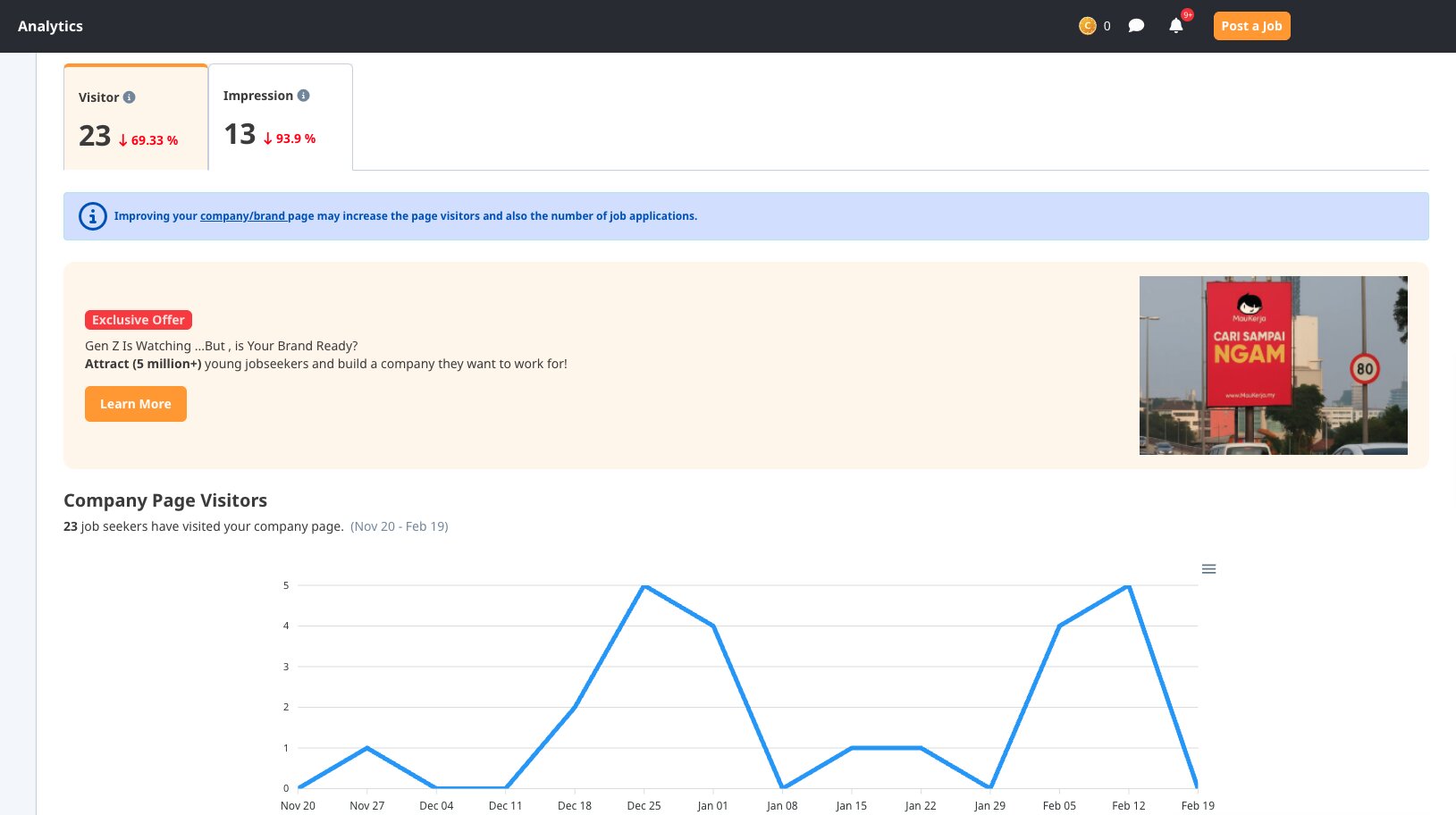
On AJobThing, employers can:
-
Manage employer branding and job listings in one place
-
View company page visits and job ad views
-
Track candidate engagement and resume uploads
-
Review applications and hiring performance
By using insights from LinkedIn and AJobThing analytics together, HR teams can improve recruitment strategy and employer visibility.
FAQs
What is a LinkedIn company page?
A LinkedIn company page is an official business profile that represents an organisation on LinkedIn and showcases company information, updates, and job opportunities.
Is a LinkedIn company page free?
Yes. Creating a basic LinkedIn company page is free. Paid features like Sponsored Content or Career Pages may require additional cost.
How can HR use LinkedIn for recruitment?
HR can:
-
Post job openings
-
Share company culture content
-
Engage with potential candidates
-
Use analytics to track engagement
What images should I use on a LinkedIn company page?
Use images with requirements below:
-
Professional company logo (400 x 400 px)
-
High-quality cover banner (1536 x 768 px)
-
Branded images that reflect company culture
Ready to Hire Quality Staff Who Fit Your Team?

AJobThing helps Malaysian employers attract the best student talent quickly and efficiently.
Read More:
-
Malaysia’s Unemployment Rate 2026: Hiring Trends and Labour Market Insights
-
How Notice Period Really Works in Malaysia for Employers and HR
-
How to Create a Job Posting That Attracts the Right Candidates
-
How Employers Should Handle Employee Misconduct in Malaysia Fairly
-
How HR in Malaysia Can Improve Resume Screening and Candidate Shortlisting
-
How to Conduct a Background Check for Employment in Malaysia
-
Onboarding Process Tips: What HR Needs to Know for Better Retention