
How to Reset Your i-Akaun (Member) Password Via The KWSP i-Akaun App

Are You Hiring?
Find candidates in 72 Hours with 5+ million talents in Maukerja Malaysia & Ricebowl using Job Ads.
Hire Now
Forgot your i-Akaun (Member) password? Don't worry. EPF (KWSP) allows members to reset their password directly through the KWSP i-Akaun app using TAC verification.
You can also use the same process if you have forgotten your User ID.
Follow this step-by-step guide to regain access to your account quickly and securely.
What Is i-Akaun (Member)?
i-Akaun (Member) is EPF's online platform that allows members to manage their EPF accounts anytime and anywhere.
Through i-Akaun, members can:
-
Check EPF savings and account balances
-
View monthly contribution records
-
Download EPF statements
-
Update personal information
-
Apply for eligible EPF withdrawals
-
Access EPF services online
If you've forgotten your login credentials, you can recover your account through the KWSP i-Akaun app.
Why Is i-Akaun Important?
i-Akaun gives members easy access to their EPF information without needing to visit an EPF branch.
By having access to i-Akaun, members can:
-
Monitor their retirement savings
-
Check whether EPF contributions have been credited correctly
-
Review contribution history
-
Access EPF services more conveniently
Keeping your i-Akaun active and accessible helps you stay informed about your EPF savings and account activity.
Before You Reset Your Password
Before starting the password reset process, make sure:
-
Your mobile number is registered with EPF
-
Your mobile number is active and able to receive SMS messages
-
You have access to the KWSP i-Akaun app
-
You have your identification document details ready
These requirements are necessary because EPF uses TAC verification to protect your account.
How to Reset Your i-Akaun Password Using the KWSP i-Akaun App
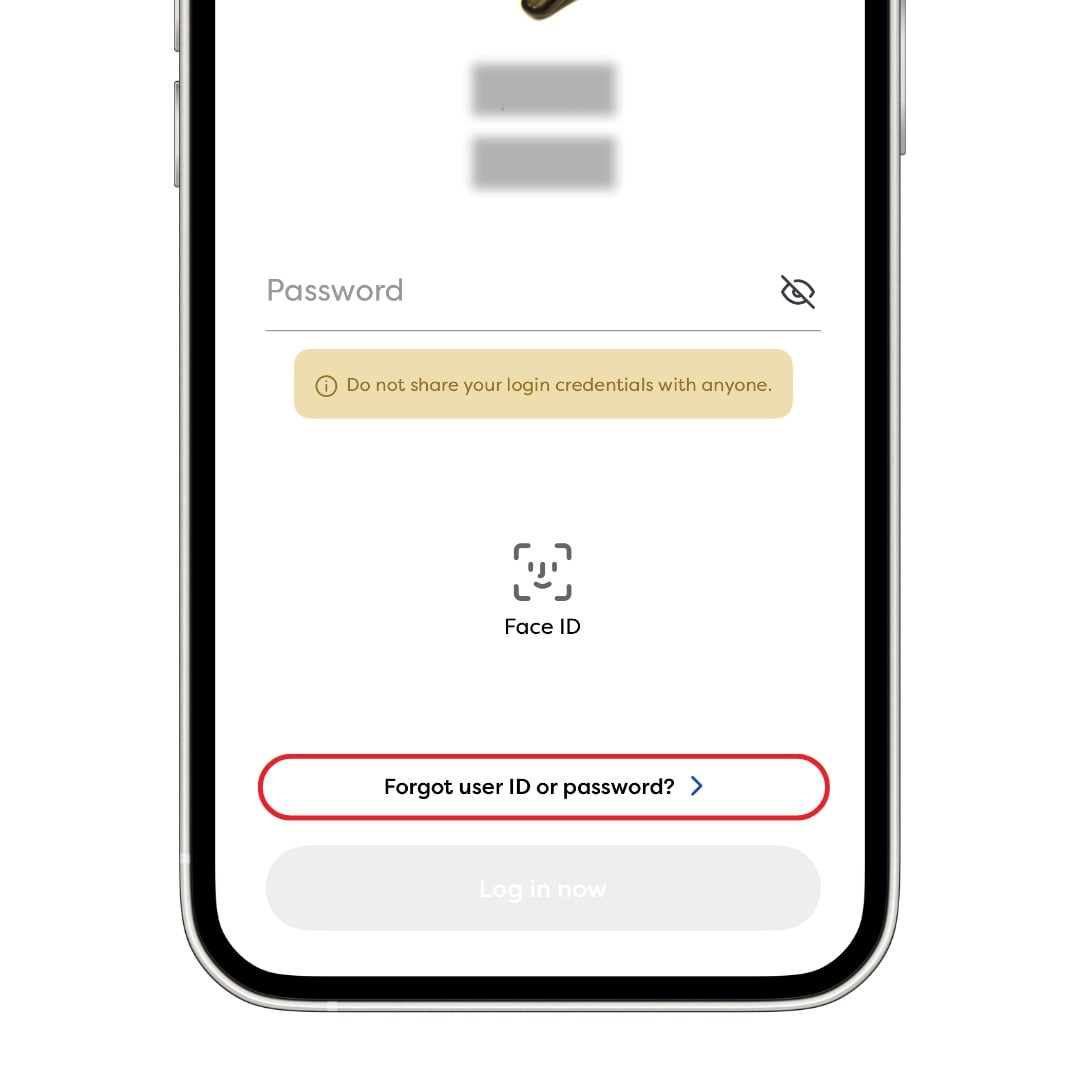
Step 1: Select "Forgot User ID or Password"
Open the KWSP i-Akaun app and tap Forgot User ID or Password on the login screen.
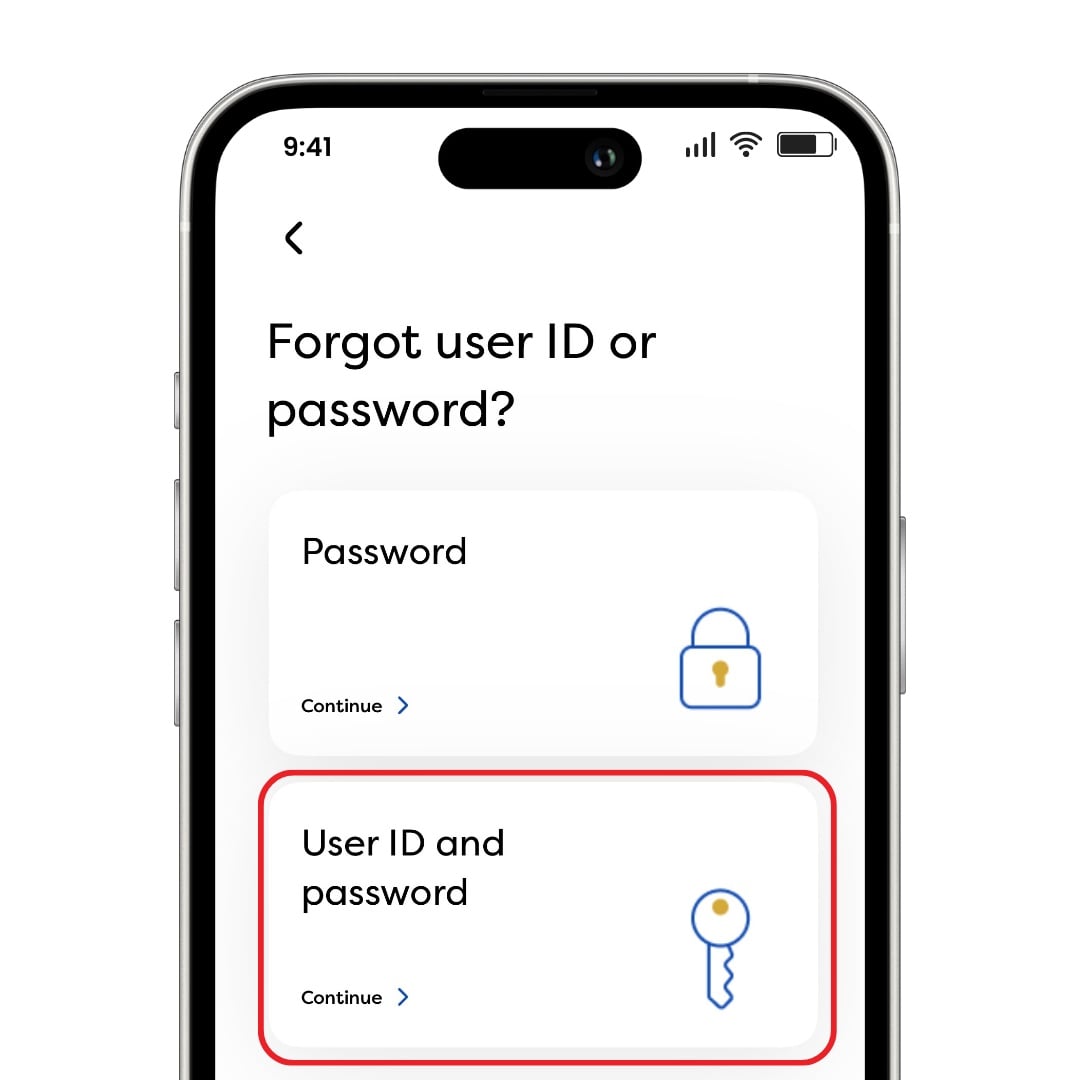
Step 2: Select "User ID and Password"
If you have forgotten both your User ID and password, select User ID and Password.
If you only need to reset your password, select Password.
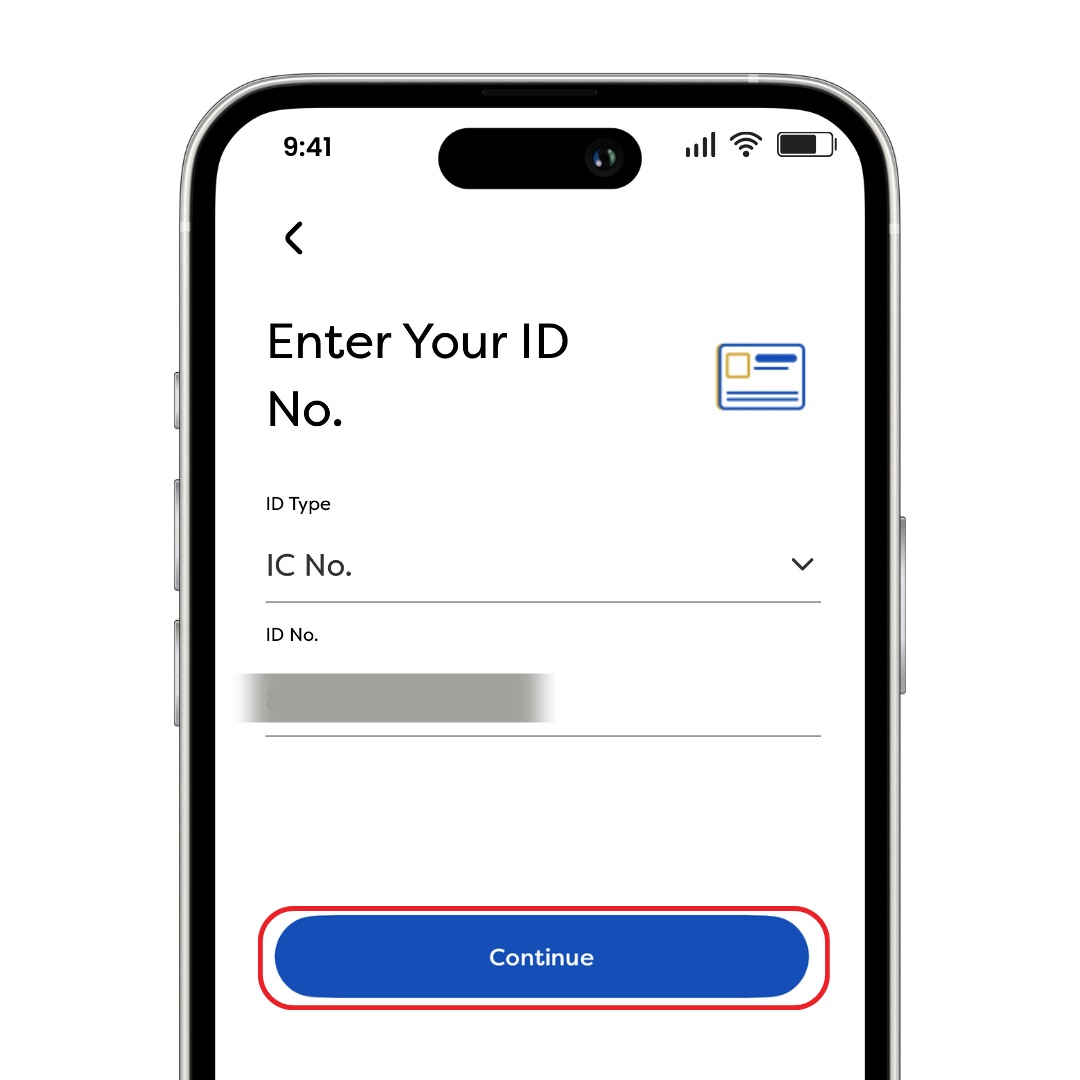
Step 3: Select Your ID Type
Choose your identification document type, enter your ID number, and tap Continue.
Step 4: Enter Your Registered Mobile Number
Enter the mobile number registered with EPF and tap Continue.
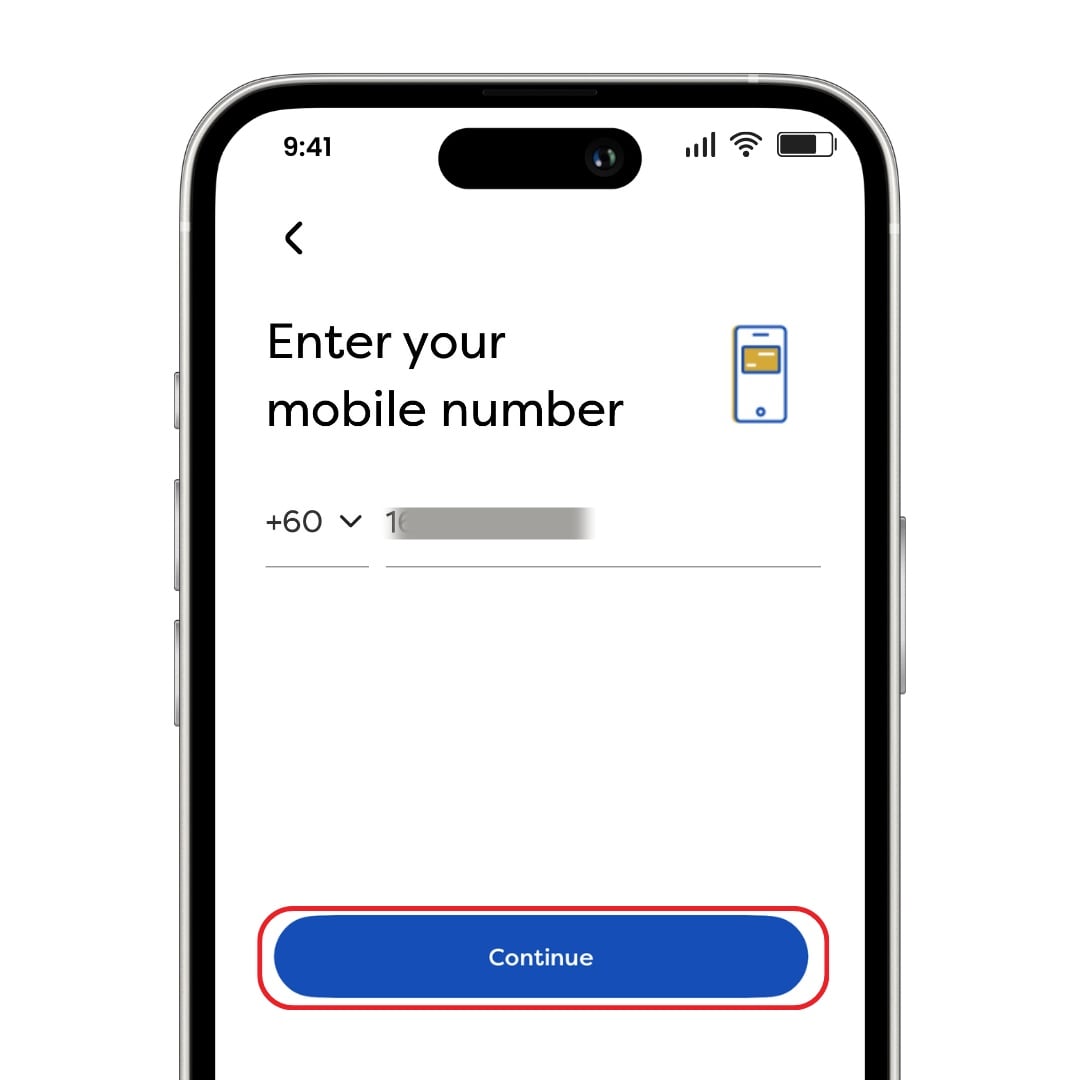
Important: Ensure the phone number registered with EPF is active and belongs to you.
Step 5: Receive Your TAC Number
EPF will send a TAC (Transaction Authorisation Code) to your registered mobile number via SMS.
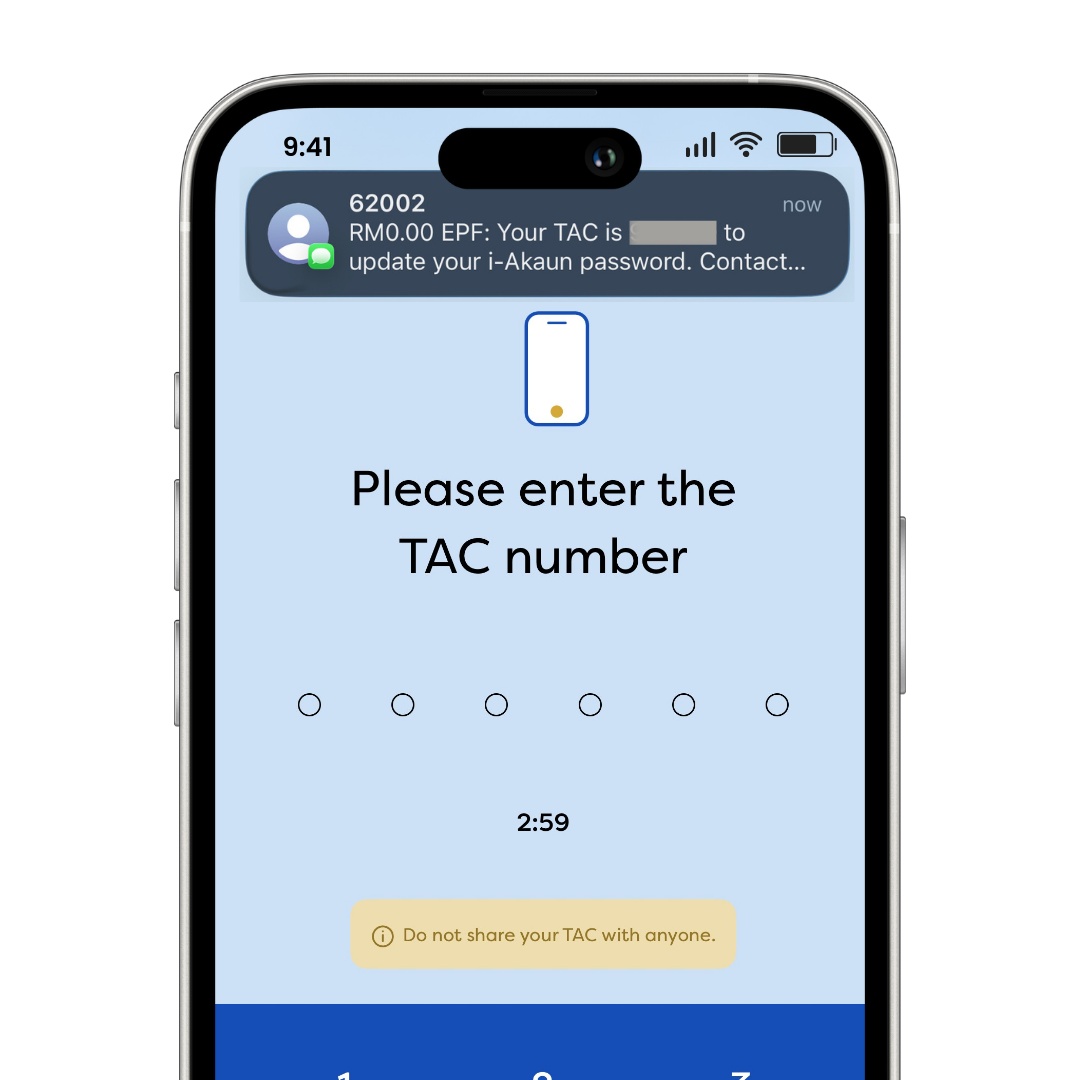
Important: Never share your TAC number with anyone.
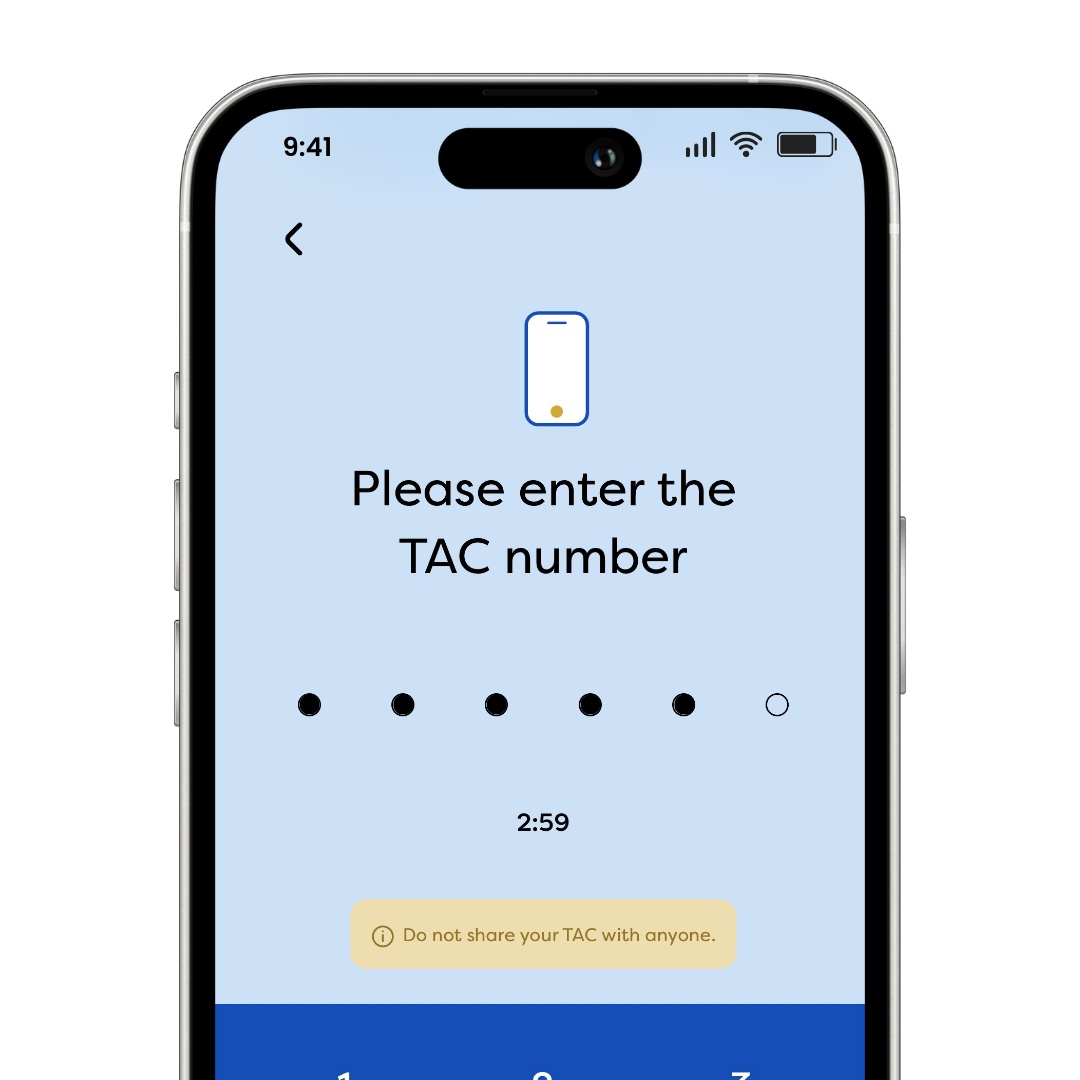
Step 6: Enter the TAC Number
Enter the 6-digit TAC code you received and proceed to the next step.
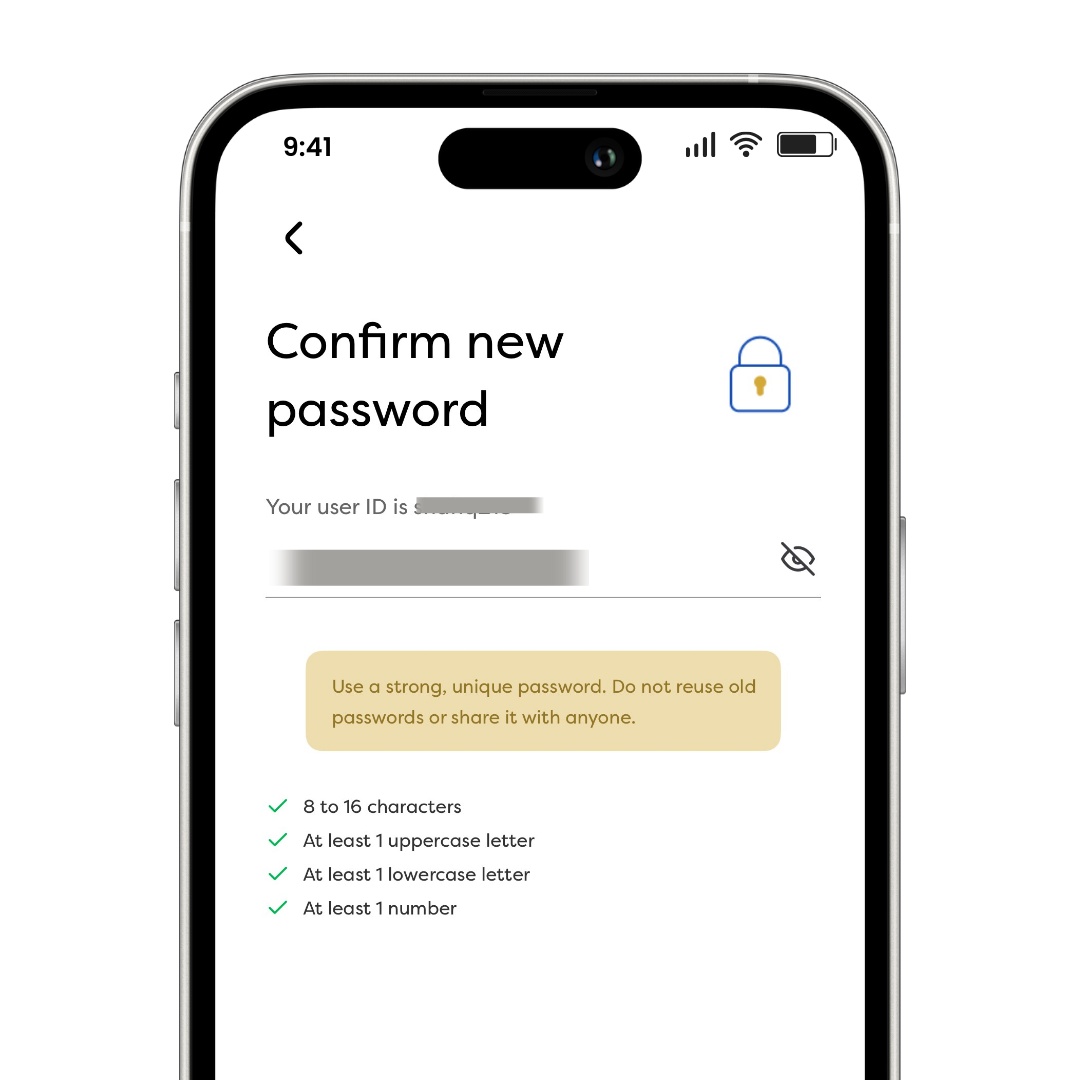
Step 7: Create a New Password
Create a new password that meets EPF's password requirements:
-
8–16 characters
-
At least one uppercase letter (A–Z)
-
At least one lowercase letter (a–z)
-
At least one number (0–9)
Your User ID will also be displayed on the screen for reference.
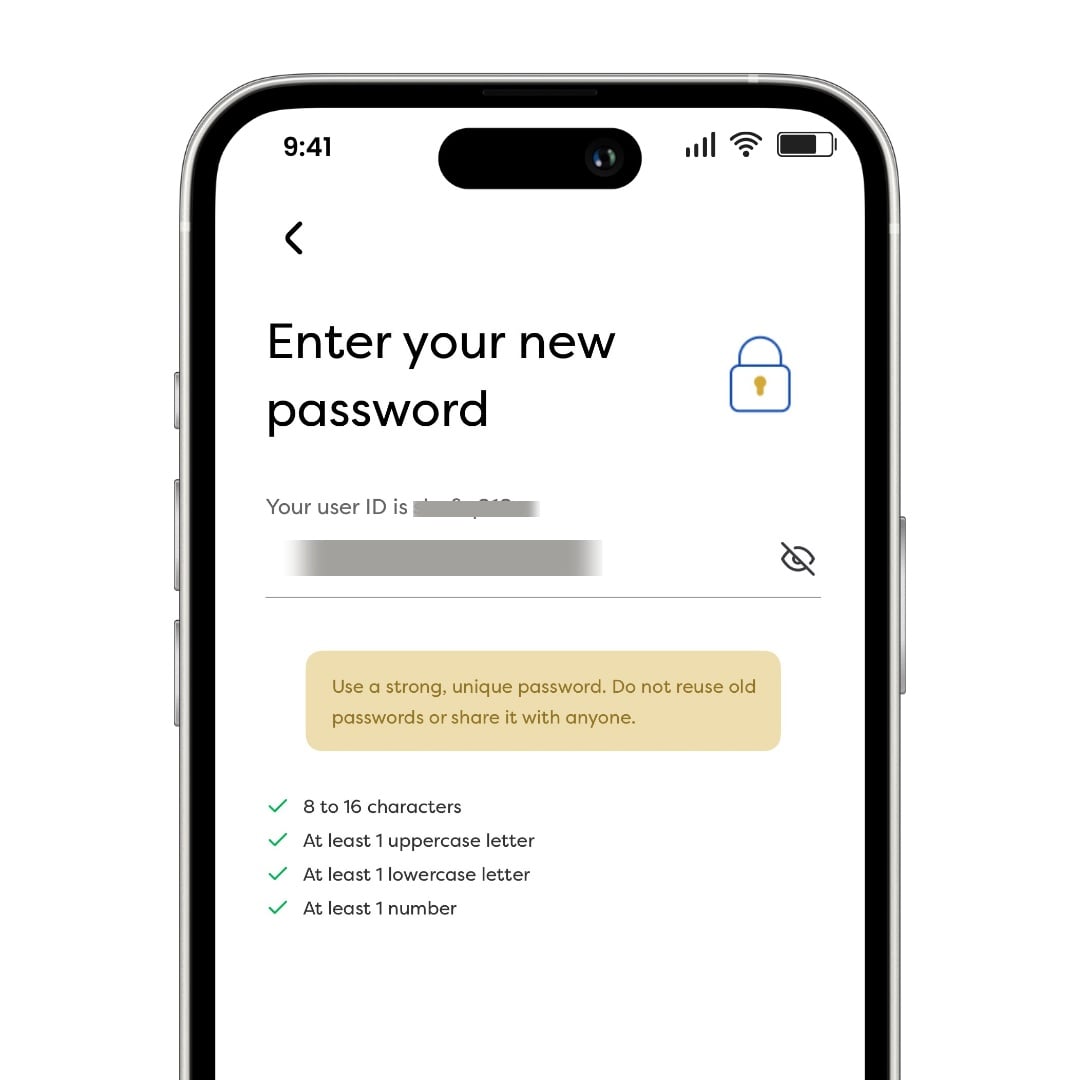
Important: Use a strong and unique password. Avoid using the same password across multiple accounts.
Step 8: Confirm Your New Password
Re-enter your new password and ensure both entries match.
Step 9: Password Reset Successful
Once completed, your password will be updated successfully.
You can now log in to your KWSP i-Akaun app using your new credentials.
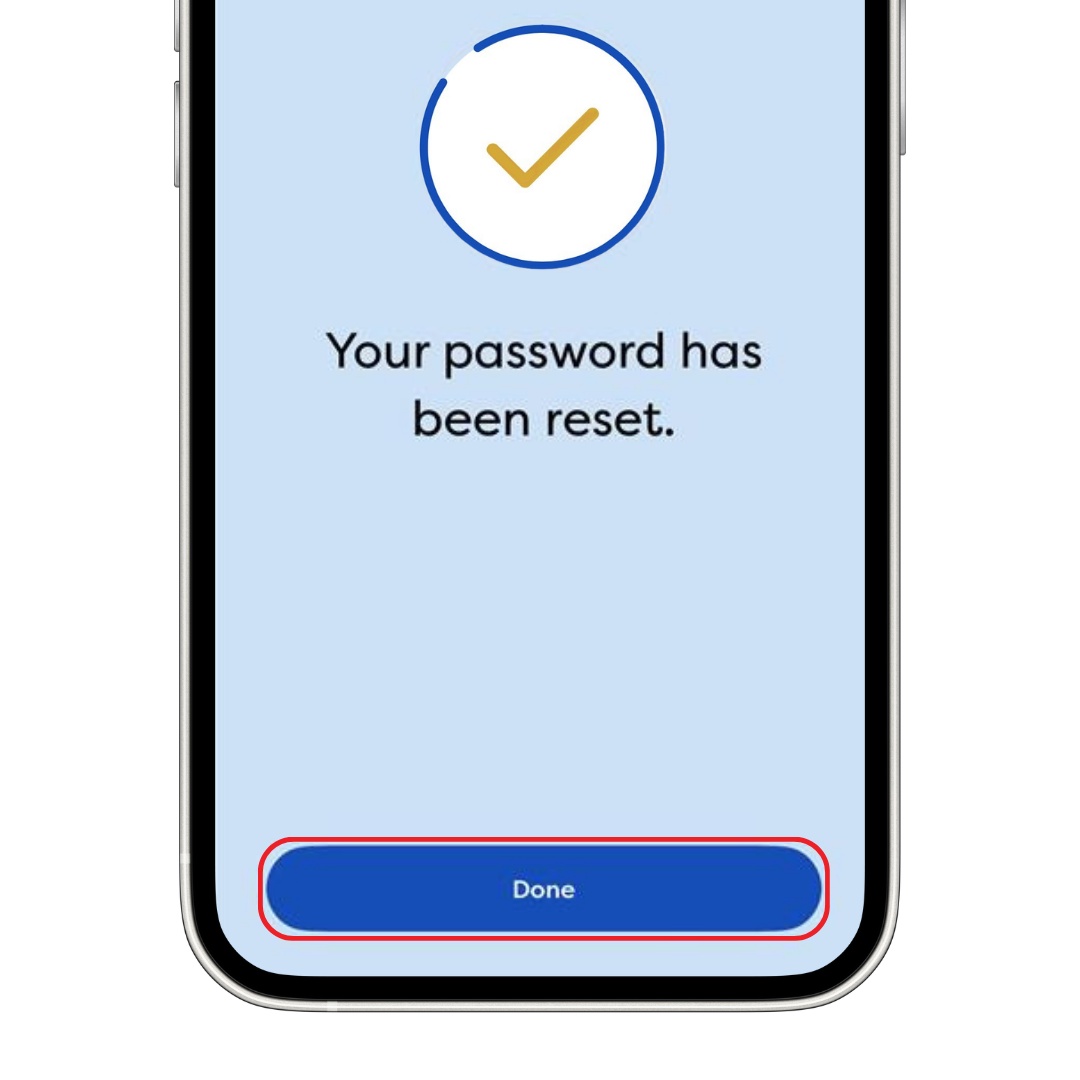
Image source: kwsp.gov.my
Why Should Employees Check Their i-Akaun Regularly?
Employees should log in to their i-Akaun account regularly to monitor their EPF contributions and account activity.
Regular checks can help you:
-
Verify employer contributions
-
Monitor retirement savings growth
-
Review contribution history
-
Detect missing or incorrect contributions early
If you notice any discrepancies, contact your employer or EPF for clarification.
Why Should Employers Encourage Employees to Use i-Akaun?
Employers can encourage employees to activate and regularly access their i-Akaun accounts.
This helps employees:
-
Verify EPF contributions independently
-
Access contribution records easily
-
Stay informed about their retirement savings
-
Reduce payroll-related enquiries
Providing employees with access to their contribution records also promotes transparency and trust in payroll administration.
Didn't Receive Your TAC Number?
You cannot reset your password without TAC verification.
If you do not receive the TAC code, try the following:
Check Your Registered Mobile Number
Ensure the phone number registered with EPF is correct and active.
Check SMS Blocking Settings
Some devices may block EPF SMS short codes.
Make sure messages from the following numbers are not blocked:
-
62002
-
62003
-
62004
-
62005
-
62006
-
62522
Check Your Mobile Network
Ensure your phone has a stable signal and can receive SMS messages.
Request a New TAC
Try requesting another TAC through the app.
Visit an EPF Office
If the issue continues, visit your nearest EPF branch or Self-Service Terminal (SST) for assistance.
Changed Your Phone Number?
If you have changed your mobile number and have not updated it with EPF, you will need to visit:
-
An EPF office, or
-
An EPF Self-Service Terminal (SST)
Please note that updating your phone number through the Profile section in the KWSP i-Akaun app or web portal does not update the number used for TAC verification.
For security purposes, TAC phone number updates must be completed in person at an EPF office or SST.
Need to Check EPF Contributions?
Use EPF Calculator to estimate employee and employer EPF contributions instantly.
FAQs
Can I Reset My i-Akaun Password Without TAC?
No. TAC verification is required to reset your password through the KWSP i-Akaun app.
What If I Forgot Both My User ID and Password?
Select User ID and Password during the recovery process. EPF will guide you through the steps to recover both credentials.
Can I Reset My Password Through the i-Akaun Website?
Yes. EPF also allows password recovery through the i-Akaun (Member) web portal.
How Long Does It Take to Reset My Password?
The process usually takes only a few minutes if your registered mobile number is active and you receive the TAC successfully.
What Should I Do If I Cannot Receive TAC Messages?
Check your registered phone number, SMS settings, and network connection. If the problem persists, visit an EPF branch or SST for assistance.
Looking to Hire Employees?
%20copy.jpg)
Post your job on AJobThing and reach qualified candidates across Malaysia faster.
Read More:
-
EPF (KWSP) Contribution Rates 2026: How Much Do Employees and Employers Contribute?
-
PERKESO Lindung 24 Jam: How Much Will Be Deducted From Your Salary?
-
SOCSO "Lindung 24 Jam": New Employee Contribution Scheme Effective 1 June 2026
-
9 Types of Skim KWSP in 2026: Which One Fits Your Retirement Goals?
-
EIS PERKESO Login: How to Claim SIP & Elaun Kehilangan Pekerjaan
-
KWSP untuk Ansuran Rumah (2026): How It Works & Who Can Apply
-
EPF Account Restructuring Guide: Akaun Fleksibel, Sejahtera & Persaraan
-
How to Calculate EPF (KWSP) in Malaysia: Contribution Rates, Payment & Rules
-
EPF Employer Responsibilities in Malaysia: Rules, Contributions & Compliance Guide
-
EPF Death Assistance Malaysia: Eligibility, Claims Process & HR Guide
-
EPF, SOCSO & EIS Contribution for Part-Time, Contract & Foreign Workers in Malaysia
-
KWSP Akaun Emas Rules and Withdrawal After Age 55 in Malaysia
-
i-Saraan Plus: Employer Guide to EPF Incentives for E-Hailing & P-Hailing Drivers in Malaysia
-
i-Suri KWSP 2026 Malaysia: Benefits, Eligibility & How It Works
-
e-Filing 2026 Malaysia: Opening Date, Deadlines & Complete Guide
-
EPF Dividends Remain Tax-Free, Says LHDN Amid 2% Dividend Tax Confusion
-
Akaun Persaraan KWSP: How It Works & Why It’s Important for Retirement Savings
-
Akaun Sejahtera KWSP: What It Is, How It Works & What You Need to Know
-
EPF SOCSO EIS Contribution 2026: Latest Rates, Rules & Employer Guide in Malaysia
-
How EPF Withdrawal Works When an Employee Leaves Malaysia Permanently
-
Simpanan Shariah KWSP: What It Is, How It Works & What Employers Should Know
-
e-Filing 2026 Malaysia: Opening Date, Deadlines & What Employers Must Know
-
Pinjaman PTPTN: How to Pay Using KWSP (EPF) Account 2 in 2026
-
Pengeluaran KWSP Untuk Haji 2026: How to Apply & Who Is Eligible
-
EPF i-Lindung Malaysia: Eligibility, Coverage, and How It Works
-
EPF (KWSP) New Updates in January 2026 for Employers & HR in Malaysia
-
Penamaan KWSP in Malaysia: Legal Implications, Process, and HR’s Role
-
Penyata KWSP: How to Check, Download & Understand Your EPF Statement
-
i-Topup KWSP: Contribution Rules & Guide for Employers in Malaysia
-
i-Simpan EPF (KWSP): How It Works & How Employees Can Contribute
-
i-Sayang KWSP Guide: Requirements, Benefits & How to Register
-
EPF, SOCSO, EIS, and LHDN Employer Registration Guide for Malaysian Companies
- Cara Kira Potongan KWSP dan SOCSO | How to Calculate EPF and SOCSO Deductions in Malaysia
-
Deadlines & Penalties for SOCSO, EPF, PCB/Form E, and HRD Levy in Malaysia
-
EPF Withdrawal for Education: Employer’s Guide to Supporting Staff
-
Akaun Fleksibel (EPF’s New Account Structure): Key Info for Employers
-
KWSP Call Centre for Employers: Contact Numbers, Services, and Support Channels