
How to Submit Form B via MyTax in Malaysia

Are You Hiring?
Find candidates in 72 Hours with 5+ million talents in Maukerja Malaysia & Ricebowl using Job Ads.
Hire Now
For many Malaysian employees, salary is not their only source of income. They may run online businesses, freelance, or earn commission. When this happens, they are usually required to file Form B instead of the usual Form BE.
As HR or an employer, you don’t file Form B on behalf of staff, but you can guide them so they stay compliant and avoid penalties.
What is Form B?
Form B is the income tax return form for individuals with business income in Malaysia. Employees need to use Form B (not Form BE) if they:
-
Run a side business as a sole proprietor
-
Work as a freelancer or gig worker (writer, designer, rider, online seller, etc.)
-
Earn significant commission income (insurance agents, property agents, etc.)
-
Are a partner in a partnership – the partnership files Form P, but each partner still files Form B
Form B is used to declare:
-
All income (business, salary, rental, commissions, etc.)
-
Business expenses
-
Tax reliefs and rebates
Submission today is mainly done online through MyTax e-Filing, which is faster and more accurate than manual forms.
What You Need Before Submitting Form B
Before logging into MyTax, it helps to prepare all documents first so the filing process is smooth. Ask employees (or yourself, if you are the taxpayer) to prepare:
MyTax Login
Registered account at mytax.hasil.gov.my (IC + password).
Business Documents
-
Profit & Loss statement for the year
-
Business registration details (SSM)
-
Bank statements, invoices, and receipts (for reference)
Supporting Documents for Tax Reliefs
EPF/SOCSO, insurance, lifestyle relief, donations, etc.
CP500 Instalment Information (If Any)
Amounts already paid through CP500 so they can be credited correctly.
Step-by-Step: How to Submit Form B via MyTax
Form B looks long, but MyTax guides you section by section. Here is the process in simple steps that HR can share with employees.
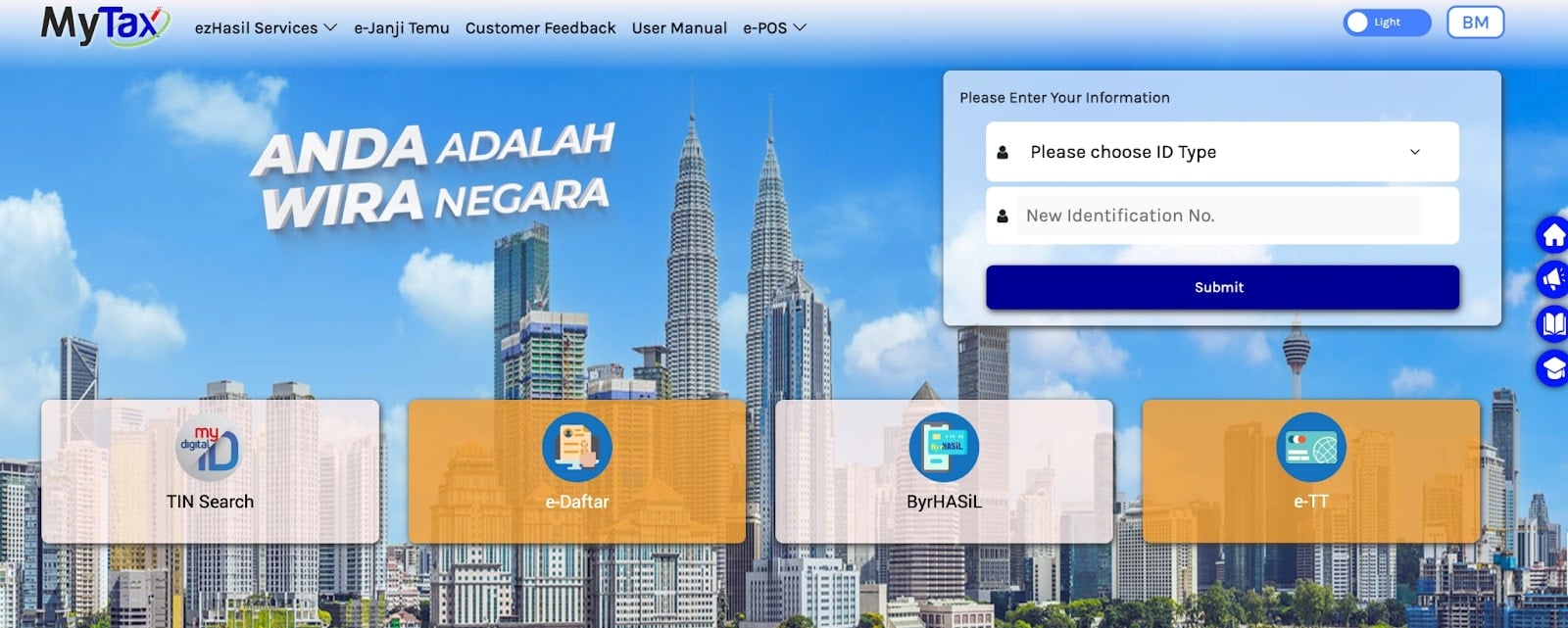
Step 1: Log In to MyTax
-
Go to mytax.hasil.gov.my.
-
Log in using MyKad / identification number and password.
-
First-time users must register for MyTax before they can use e-Filing.
Step 2: Access e-Filing
-
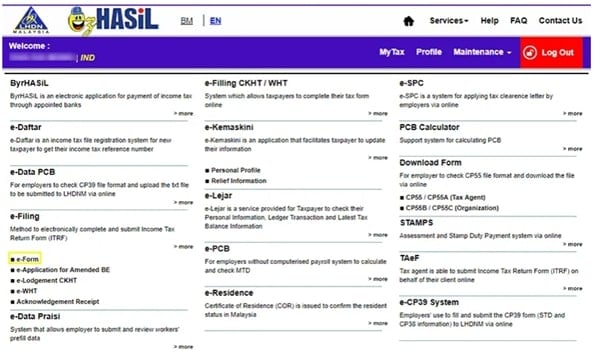
On the main page, click e-Filing.
-
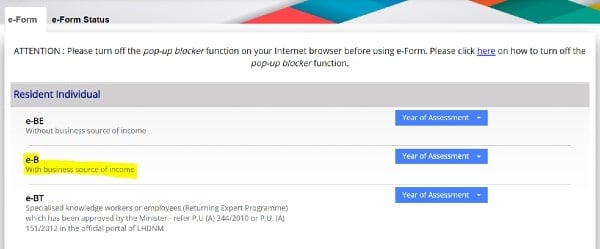
Select e-Form (e-Borang).
-
Choose Form B / e-B for the correct Year of Assessment (YA).
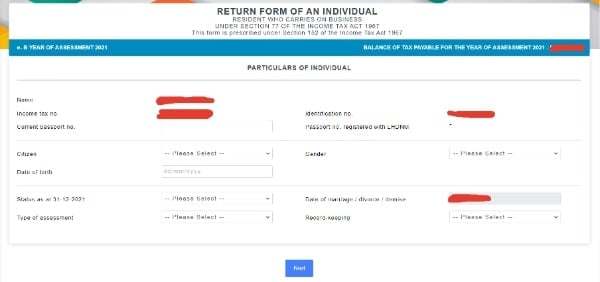
Step 3: Fill In Personal Details
-
Check that name, IC number, address, email, and phone number are correct.
-
Update any changes (for example, new address or marital status).
Step 4: Declare Business Income
-
Go to the business income section.
-
Enter:
-
Gross income from business or freelance work
-
Allowable business expenses (rent, utilities, marketing, transport, etc.)
-
-
The system will calculate net profit or loss based on the figures, which should match the Profit & Loss statement.
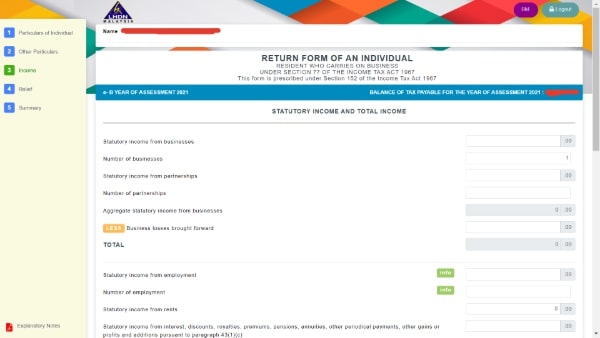
Step 5: Declare Other Income (If Any)
If the individual also has other income, they must declare it here, for example:
-
Employment income (salary)
-
Rental income
-
Dividends or interest
-
Commission not already included in business income
This gives LHDN a full picture of total income for the year.
Step 6: Input Tax Reliefs & Rebates
-
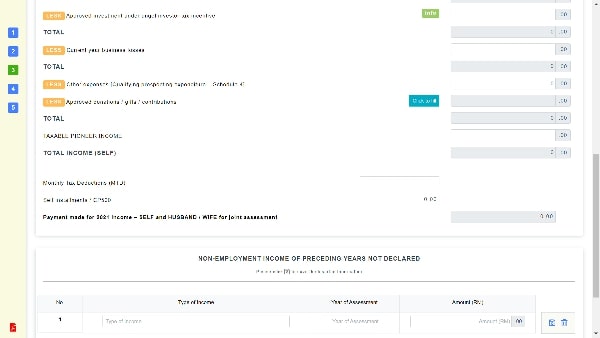
Go to the relief and rebate section.
-
Enter eligible items such as:
-
EPF and life insurance
-
SOCSO/EIS
-
Lifestyle relief (books, gadgets, internet)
-
Medical expenses for self or parents
-
Approved donations or zakat
-
-
These reliefs help reduce chargeable income and the final tax amount.
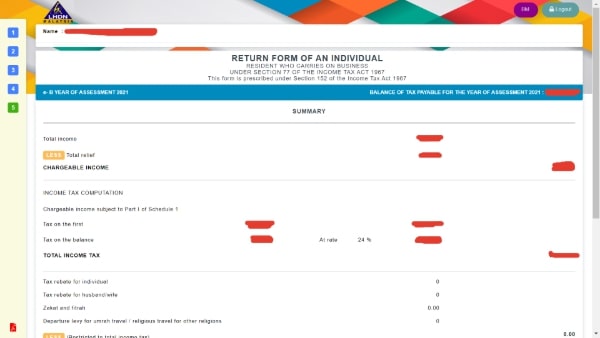
Step 7: Review the Tax Summary
-
At the Summary page, MyTax will automatically calculate:
-
Total income
-
Total reliefs
-
Tax payable or tax refund
-
CP500 instalments already paid (if applicable)
-
-
Carefully review the numbers. If something looks wrong, go back and edit the relevant sections.
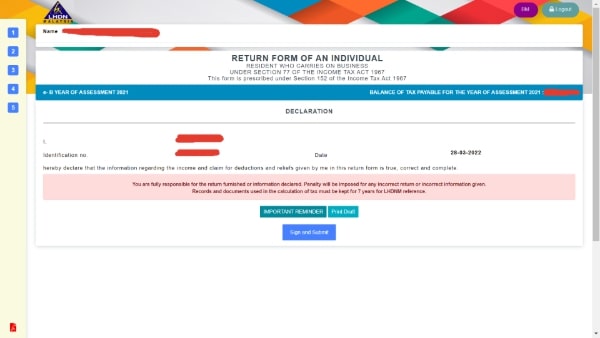
Step 8: Submit Form B
-
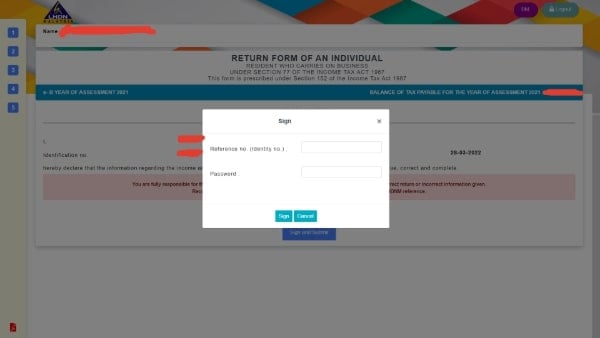
When everything is correct, click Sign and Submit.
-
Enter IC number and password to sign the declaration.
-
After successful submission, download and save the acknowledgement slip (PDF). This is proof of filing and often needed for loan applications or future reference.
Step 9: Make Payment (If Tax Is Payable)
-
If there is tax payable, MyTax will show the amount due.
-
Pay using FPX or other available methods directly from the portal or later via LHDN’s payment channels.
-
Save the payment receipt for your records.
Tips for a Smooth Form B Submission
A few small habits can help your employees file Form B smoothly and avoid unnecessary stress.
Practical tips you can share as HR:
Prepare Documents Early
Ask staff to keep a simple folder for income and expense records throughout the year.
Don't Wait Until the Deadline
For recent YA references, manual Form B deadlines are around 30 June, and e-Filing deadlines are around mid-July. Filing early avoids slow systems and last-minute mistakes.
Check Figures Carefully
Remind staff to double-check income, expenses, and reliefs before submitting. Errors can trigger queries or amendments later.
Keep Copies of Everything
Encourage employees to save their acknowledgement slip and key working sheets. This helps if LHDN requests clarification.
FAQs
Do I need to submit Form B online?
Today, e-Filing via MyTax is the preferred method. It is faster, more secure, and reduces calculation errors. Manual filing is still possible, but MyTax is strongly encouraged.
When is the deadline for Form B?
In recent years, for Year of Assessment 2024, the deadlines are:
-
Manual submission: 30 June
-
e-Filing (MyTax): 15 July
Future years are usually similar, but HR should always check LHDN’s latest deadline announcement for the correct year.
What happens after I submit Form B?
After submission:
-
MyTax generates an acknowledgement slip confirming receipt.
-
LHDN reviews the information and will accept it as filed unless they find issues.
-
If there is tax payable, the employee must pay by the due date; if there is overpayment, LHDN may issue a refund to the bank account provided.
Can I edit Form B after submitting?
Yes, minor corrections may be done through e-Amendment within a limited time after submission, or by contacting LHDN for further guidance.
Do I still need to submit Form B if my business made zero profit?
Yes. If an individual is registered and has business activity, they generally still need to file Form B, even if the business made a loss or zero profit. They can report the loss and any eligible reliefs. Non-filing can still lead to penalties.
Your Next Hire Could be Just a Click Away!

At AJobThing, we connect you with 5+ million jobseekers in Malaysia, ensuring you hire the best.
Post your job ads today & simplify your hiring process!
Read More:
-
Cara Claim SOCSO Kemalangan: A Complete HR Guide for Work Accident Claims
-
i-Sayang KWSP Guide: Requirements, Benefits & How to Register
-
EPF, SOCSO, EIS, and LHDN Employer Registration Guide for Malaysian Companies
- Cara Kira Potongan KWSP dan SOCSO | How to Calculate EPF and SOCSO Deductions in Malaysia
-
Statutory Contributions in Malaysia Explained for Employers and HR
-
Deadlines & Penalties for SOCSO, EPF, PCB/Form E, and HRD Levy in Malaysia
-
PCB for Foreign Workers in Malaysia: Employer’s Complete Guide
-
EPF Withdrawal for Education: Employer’s Guide to Supporting Staff
-
Akaun Fleksibel (EPF’s New Account Structure): Key Info for Employers
-
KWSP Call Centre for Employers: Contact Numbers, Services, and Support Channels
-
How to Check KWSP/EPF Balance: Online, SMS, Call Center, and More (2025)