


Malaysia Income Tax Exemption 2025 Guide for Employers & HR | e-Filling 2026

Managing income tax season does not only affect employees. For HR teams and employers, it is a critical compliance period that requires accurate payroll data, proper documentation, and timely statutory submission.
This guide is prepared to help employers and HR teams in Malaysia clearly understand:
-
What income tax exemptions apply for Assessment Year 2025
-
What employees will declare during e-Filing 2026
-
What documents employers must prepare
-
How HR can support employees and avoid payroll or tax issues
All explanations are written in easy English, suitable for Malaysian workplaces.
Why Income Tax Matters for Employers and HR
Although employees submit their own income tax returns, employers play an essential role in the process.
HR responsibilities directly affect employee tax filing, including:
-
Issuing accurate EA Forms
-
Ensuring correct PCB deductions
-
Submitting employer tax forms on time
-
Maintaining complete payroll records
Errors or delays may result in:
-
Employee dissatisfaction
-
Incorrect tax filing
-
Delayed tax refunds
-
LHDN audit risks
-
Possible penalties
Understanding tax exemptions and e-Filing requirements helps HR teams manage tax season smoothly every year.
Official Updates: Income Tax 2025
(Filed During e-Filing 2026)
The following updates apply to Assessment Year 2025, which employees will declare during e-Filing in 2026.
First-Time Home Loan Interest Relief
Applicable for:
-
First residential property purchase
-
Sales & Purchase Agreement signed between 1 January 2025 – 31 December 2027
Relief amount:
-
RM7,000 – house price up to RM500,000
-
RM5,000 – house price RM500,001 to RM750,000
This relief can be claimed for three consecutive assessment years, starting from the year interest is paid.
Education and Medical Insurance Premium Relief
-
Relief cap increased from RM3,000 to RM4,000
-
Covers medical insurance and education insurance
Tax Relief for Persons with Disabilities (PWD)
|
Category |
Before YA 2025 |
From YA 2025 |
|
Disabled individual |
RM6,000 |
RM7,000 |
|
Disabled spouse |
RM5,000 |
RM6,000 |
|
Unmarried disabled child |
RM6,000 |
RM8,000 |
HR should ensure employee personal information is reflected correctly in EA Forms where applicable.
List of Individual Tax Reliefs
Assessment Year 2025 (e-Filing 2026)
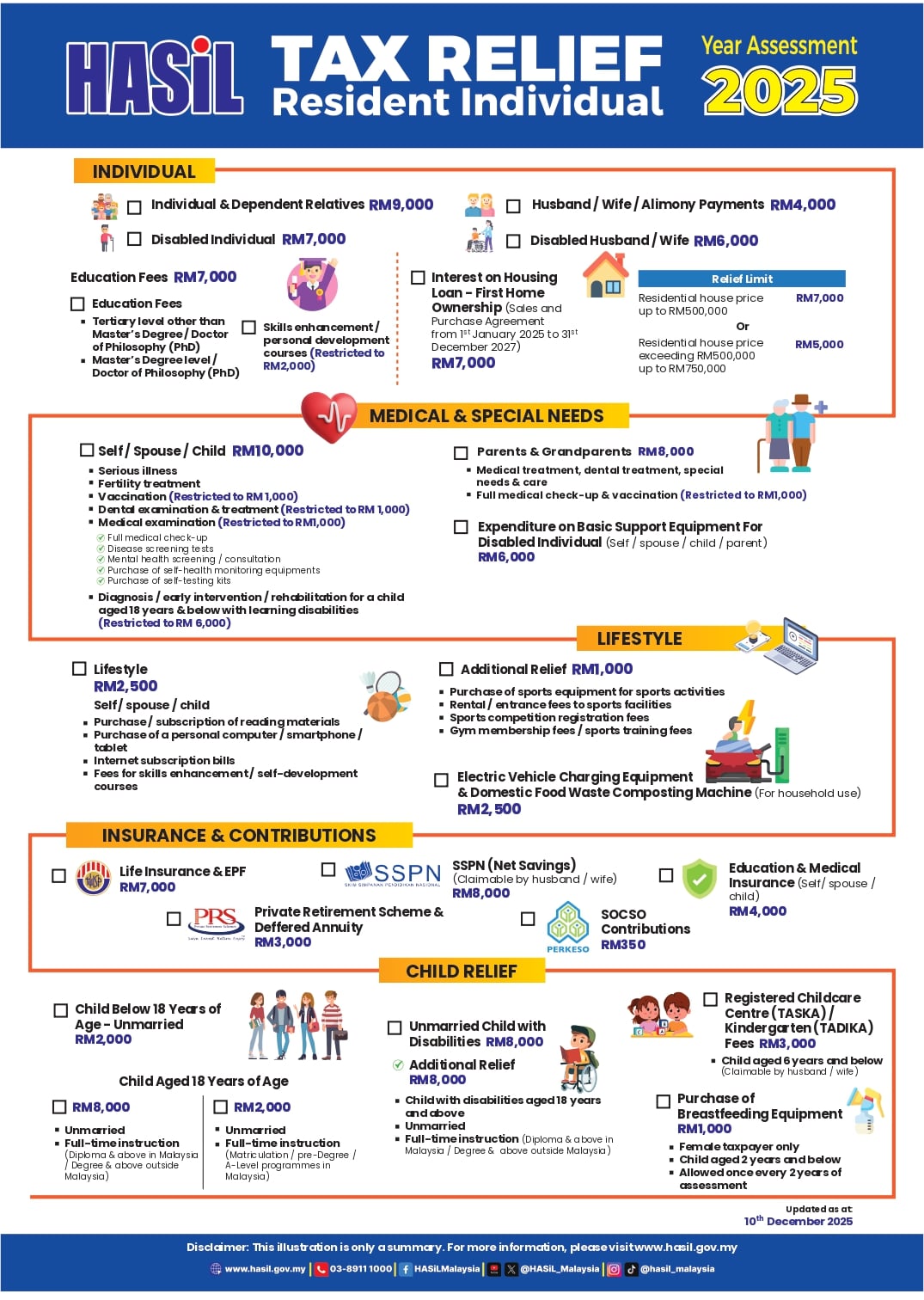
Individual Relief
-
Individual and dependent relatives: RM9,000
-
Disabled individual: RM7,000
-
Disabled spouse: RM6,000
-
Spouse or alimony: RM4,000
-
Self-education fees: RM7,000
-
First home loan interest: RM7,000 / RM5,000
Medical, Lifestyle & Equipment Reliefs
Medical reliefs include:
-
Serious illness treatment
-
Fertility treatment
-
Vaccination (up to RM1,000)
-
Dental treatment (up to RM1,000)
-
Mental health consultation
-
Medical check-ups
Other reliefs:
-
Medical expenses for parents: RM8,000
-
Special needs equipment: RM6,000
-
EV charging equipment: RM2,500
Lifestyle relief (RM2,500):
-
Laptop or computer
-
Smartphone or tablet
-
Internet subscription
-
Books
-
Skill courses
Sports-related relief: RM1,000
Child Relief
-
Child below 18 years: RM2,000
-
Child above 18 (full-time student): RM2,000
-
Higher education child: RM8,000
-
Disabled child: RM8,000
-
Additional disabled child relief: RM8,000
-
Childcare fees (6 years and below): RM3,000
-
Breastfeeding equipment: RM1,000
Contributions & Savings Relief
-
Life insurance & EPF: RM7,000
-
EPF only: RM4,000
-
SOCSO: RM350
-
Medical & education insurance: RM4,000
-
Private Retirement Scheme (PRS): RM3,000
-
SSPN net savings: RM8,000
Who Is Required to Pay Income Tax in Malaysia
Income tax liability depends on marital status, number of children, and type of assessment.
Estimated Income Threshold (Reference Only)
|
Type of Assessment |
Annual (RM) |
Monthly (RM) |
|
Individual / Single |
36,000 |
3,000 |
|
Married (Separate) – 0 child |
36,000 |
3,000 |
|
Married (Separate) – 1 child |
38,000 |
3,167 |
|
Married (Separate) – 2 children |
40,000 |
3,333 |
|
Married (Joint) – 0 child |
46,000 |
3,833 |
|
Married (Joint) – 1 child |
49,000 |
4,083 |
|
Married (Joint) – 2 children |
52,000 |
4,333 |
Figures are estimates only. Actual tax payable depends on relief claims and LHDN assessment.
Employer Role in Income Tax Compliance
Employers must:
-
Deduct PCB monthly
-
Submit CP39 payments
-
Issue EA Forms before end of February
-
Submit Form E
-
Keep payroll records for at least 7 years
e-Filing 2026 Timeline (Assessment Year 2025)
-
Filing opens: 1 March 2026
Deadlines:
-
BE (no business income): 15 May 2026 (e-Filing)
-
B (with business income): 15 July 2026 (e-Filing)
Documents Employees Need (Prepared by HR)
-
EA Form
-
Payroll summary
-
PCB deduction record
-
EPF and SOCSO contribution figures
e-Filing Process for Employees
Employees must submit their own income tax return through the MyTax LHDN portal. HR does not file on behalf of employees but must ensure all payroll data is accurate.
Step 1: Register Income Tax Number (First-Time Only)
Employees who have never filed tax must register through:
-
e-Daftar (online – recommended), or
-
LHDN branch counter
Documents usually required:
-
MyKad or passport
-
Payslip or income statement
-
Business registration (if applicable)
Step 2: Activate MyTax Account
After receiving the tax number, employees must:
-
Request PIN via e-CP55D
-
Confirm registered email
-
Click activation link sent by LHDN
Activation link is valid for 2 days.
Step 3: Register Digital Certificate
Employees will:
-
Create password
-
Create security phrase
-
Confirm personal details
Once completed, MyTax account is fully activated.
Step 4: Log In to MyTax
Login using:
-
IC or passport number
-
Password
-
Security phrase
Step 5: Submit e-Filing

-
Log in to MyTax
-
Click Filing & Submission
-
Select Assessment Year 2025
-
Choose form:
-
Enter income based on EA Form
-
Declare PCB deducted
-
Claim tax reliefs
-
Review summary
Step 6: Sign & Submit
-
Click Sign & Submit
-
Enter IC number and password
-
Save submission receipt
Receipts and documents must be kept for 7 years.
Consequences of Non-Compliance
-
10% penalty on unpaid tax
-
Additional 5% late payment penalty
-
Legal action by LHDN
-
Travel restrictions
-
Asset seizure in severe cases
Notes for Employers and HR
Income tax season is not only an employee responsibility.
HR and employers play a critical role in ensuring:
-
Accurate payroll processing
-
Correct statutory deductions
-
Timely documentation
-
Smooth e-Filing experience for employees
With proper preparation and the right tools, HR teams can minimise errors, reduce employee complaints, and maintain full tax compliance.
For a clearer explanation, you can also refer to this video guide:
FAQs
If PCB is already deducted, do I still need to submit e-Filing?
Yes. PCB is only a monthly deduction. You must still submit e-Filing every year to declare your income and tax reliefs.
What if my EA Form details are wrong?
Inform your HR team immediately. HR will issue a corrected EA Form if needed.
Do I need to upload receipts for tax relief?
No. Receipts do not need to be uploaded, but must be kept for 7 years for LHDN checking.
Are bonuses and allowances taxable?
Yes. Bonuses, commissions, overtime and most allowances are taxable and must be declared.
What happens if I don’t submit e-Filing?
You may face penalties or legal action. Once you have a tax number, annual e-Filing is required even if no tax is payable.
Calculate Payroll & Statutory Contributions the Easy Way
During tax season, doing a quick check can help avoid mistakes later. HR teams can use the calculators below as a simple reference before finalising payroll.
-
PCB Calculator - Use this calculator to roughly estimate monthly PCB deductions based on salary, EPF contribution and tax category.
-
EPF / SOCSO / EIS Calculator - Easily check statutory contribution amounts for both employer and employee portions.
Looking to Hire Staff?
Post your job ad on AJobThing and reach millions of jobseekers across Malaysia — all in one place.

Read More:
-
LHDN Stamp Duty Requirements for Business and Employment Documents in Malaysia
-
What Employers Must Submit Through LHDN e-Filing in Malaysia
-
i-Topup KWSP: Contribution Rules & Guide for Employers in Malaysia
-
i-Simpan EPF (KWSP): How It Works & How Employees Can Contribute
-
EPF (KWSP) New Updates in January 2026 for Employers & HR in Malaysia
-
Penamaan KWSP in Malaysia: Legal Implications, Process, and HR’s Role
-
i-Sayang KWSP Guide: Requirements, Benefits & How to Register
-
EPF, SOCSO, EIS, and LHDN Employer Registration Guide for Malaysian Companies
- Cara Kira Potongan KWSP dan SOCSO | How to Calculate EPF and SOCSO Deductions in Malaysia
-
Deadlines & Penalties for SOCSO, EPF, PCB/Form E, and HRD Levy in Malaysia
-
PCB for Foreign Workers in Malaysia: Employer’s Complete Guide
-
EPF Withdrawal for Education: Employer’s Guide to Supporting Staff
-
Akaun Fleksibel (EPF’s New Account Structure): Key Info for Employers
-
KWSP Call Centre for Employers: Contact Numbers, Services, and Support Channels