


MyKad Online: How to Replace Your MyKad Through the JPN Portal

Many Malaysians still think that every MyKad replacement must be done at the Jabatan Pendaftaran Negara (JPN) counter. This is understandable because MyKad is an important identity document, and some replacement cases still require physical verification at JPN.
However, selected MyKad replacement applications can now be done online through the official JPN replacement portal.
Through the MyKad online replacement system, users can submit their application digitally, make payment online, and choose a JPN or UTC branch for collection.
That said, not every MyKad replacement case is eligible for online application. Some cases still require applicants to visit JPN in person, especially when new fingerprints, new photos, police reports, or further verification are needed.
This guide explains who can apply for MyKad online replacement, who must still visit the JPN counter, the step-by-step process, required documents, fees, collection timeline, and common mistakes to avoid.
What is Tukar MyKad Online
Tukar MyKad online refers to the online replacement service provided through the JPN MyKad replacement portal.
It allows eligible Malaysians to apply for a replacement MyKad without starting the full process at the counter. Instead of going to JPN first, applicants can submit their details online, choose the type of replacement, select a collection branch, and complete payment digitally.
The application is done through the official Sistem Gantian MyKad JPN portal at:
Even though the application starts online, the applicant still needs to visit the selected JPN or UTC branch to collect the new MyKad, since biometric verification is still required before the new card can be issued and activated.
Online MyKad Replacement Eligibility
Not all MyKad replacement cases can be done online. The online system is only available for selected replacement categories.
Damaged MyKad
You can apply online if your MyKad is physically damaged, including situations where the card is broken, cracked, torn, or the outer layer is damaged.
For example, if the MyKad can no longer be used properly because of physical damage, the applicant may use the online replacement portal, as long as the case falls under the allowed category.
However, the applicant should still bring the damaged original MyKad during collection, if available.
Damaged MyKad Chip
MyKad contains a chip that may be used for verification by banks, government agencies, and other institutions. If the chip is no longer readable, the card may need to be replaced.
Applicants whose MyKad chip is faulty can use the online replacement system under the damaged chip category.
This is useful for people whose card still looks fine physically but cannot be read by machines or systems.
First-Time Lost MyKad
If your MyKad is lost for the first time due to your own carelessness, you may apply for a replacement online.
However, this is only allowed for first-time loss cases. If the MyKad has been lost for the second time, third time, or more, the applicant cannot use the online system and must go to the JPN counter.
This is because repeated loss cases may require additional checking or investigation.
Normal Replacement or Upgrade to Latest MyKad Version
The online system also allows normal MyKad replacement. This may include replacing an older version of the identity card with a newer MyKad version.
It is useful for applicants who do not need to update major personal information, change fingerprints, or take a new photo, but simply want to replace or upgrade the card.
Cases That Cannot Be Processed Online
Although the MyKad online service is convenient, several categories still require a physical visit to the JPN counter.
18-Year-Old Mandatory Replacement
Malaysians are required to replace their MyKad at certain age stages. One important category is the mandatory replacement at 18 years old.
This cannot be done online because it requires a new adult photo and an updated fingerprint scan at the JPN counter.
Therefore, applicants who need to complete the 18-year-old mandatory replacement must go to JPN in person.
Lost MyKad More Than Once
The online system only allows first-time lost MyKad applications.
If your MyKad is lost for the second time or more, you must visit the JPN counter. These cases may require further checking before a replacement can be approved.
Lost MyKad Due to Criminal Cases
If your MyKad was lost because of a criminal incident such as robbery, snatch theft, or house break-in, you cannot apply online.
These cases require additional documentation, such as a police report, and must be handled at the counter.
Changing to a Latest Face Photo
If the purpose of the replacement is to update your latest face photo, you must go to the JPN counter.
Photo updates require a new photo capture process, which cannot be completed through the online replacement system.
Cases Involving Fingerprint Updates
Any case that requires fingerprint updates or new biometric data must be done at JPN.
Since biometric verification is a key part of MyKad issuance, applicants who need fingerprint changes cannot complete the full process online.
Cara Tukar MyKad Online
Here is the step-by-step process to replace MyKad online through the JPN portal.
Step 1: Visit the MyKad Replacement Portal
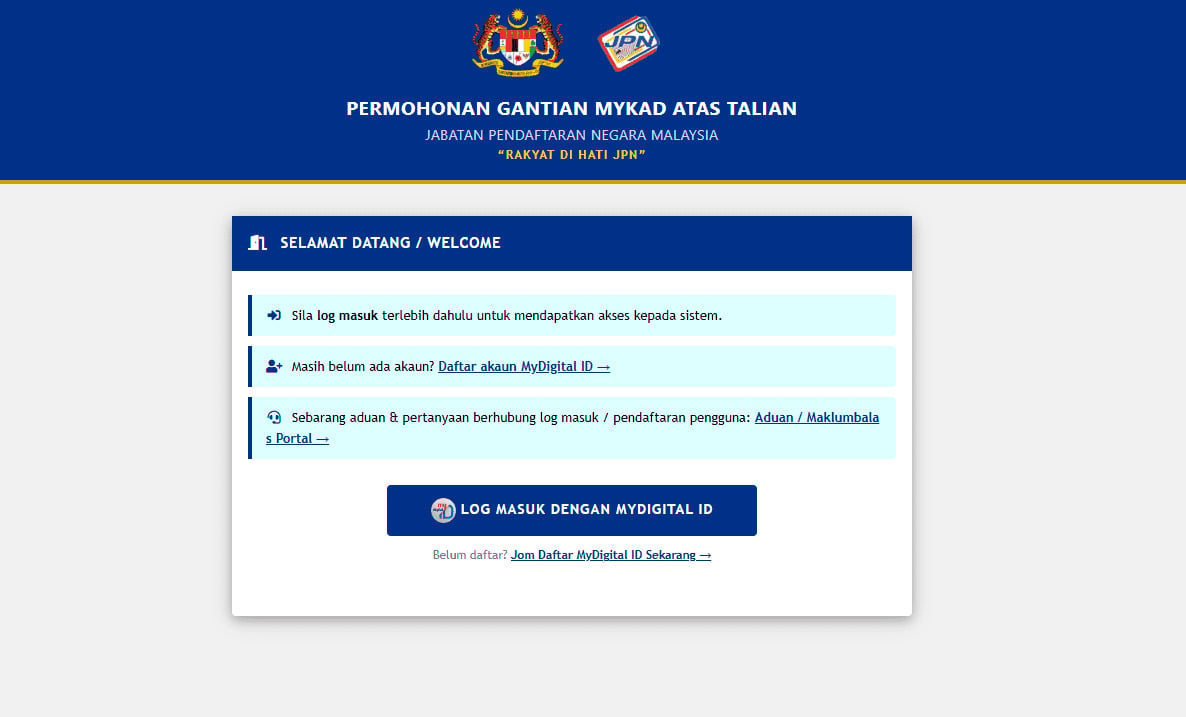
Go to the official JPN MyKad replacement portal: gantianmykad.jpn.gov.my
From there, applicants need to log in using MyDigital ID. This means users should already have access to MyDigital ID before starting the application.
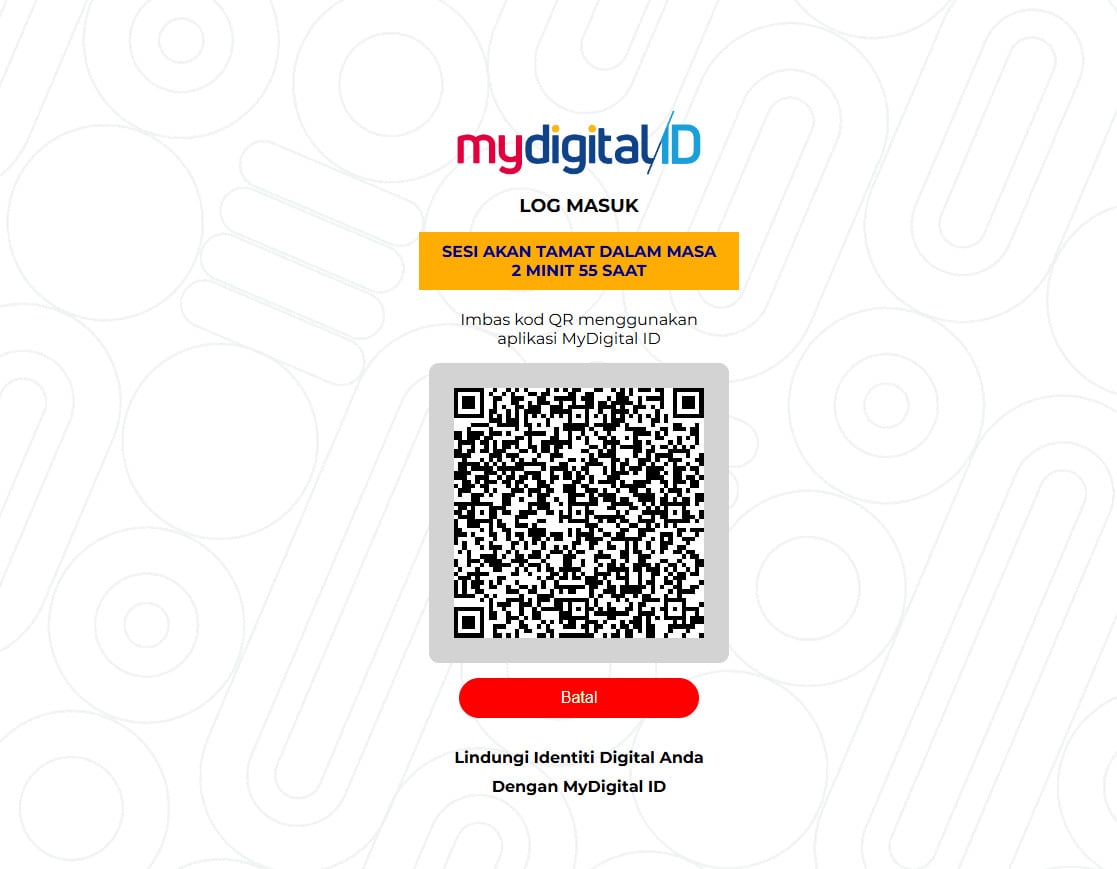
Image source: ecentral.my
Step 2: Verify Login Using MyDigital ID
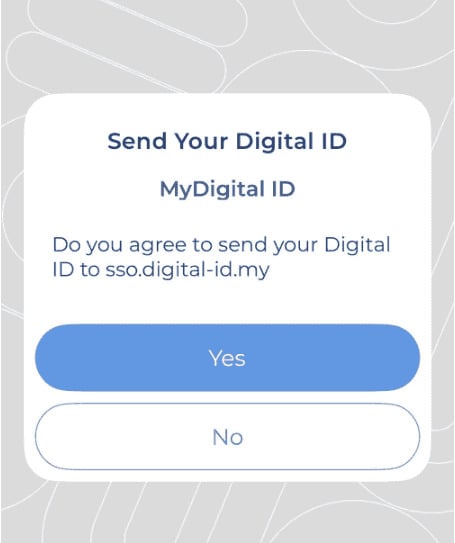
Image source: ecentral.my
After choosing to log in with MyDigital ID, the system will ask the applicant to scan a QR code using the MyDigital ID application.
The applicant must complete the identity verification process through the app. This helps confirm that the person applying is the rightful MyKad owner.
Step 3: Give Digital ID Consent
After scanning the QR code, the applicant may be asked to approve the sharing of their digital identity information.
The applicant should review the prompt and click the consent button to continue the application process.
Step 4: Choose the Replacement Category
Next, choose the correct replacement category. The categories include damaged card, damaged chip, normal replacement, or first-time lost MyKad.
Choosing the wrong category may cause the application to be rejected or require the applicant to visit the JPN counter instead.
Step 5: Fill in the Required Application Details
After selecting the replacement category, complete the details requested in the portal.
Applicants should make sure all information is accurate before submitting. Any incorrect details may delay the replacement process.
Step 6: Select a JPN or UTC Collection Branch
Applicants must choose where they want to collect the new MyKad.
The available collection locations may include selected JPN branches or UTC locations. It is better to choose a location that is convenient and easy to visit once the card is ready.
Step 7: Make Online Payment
Payment must be completed online during the application process, through FPX, debit card, or credit card. Cash payment is not allowed during collection for online applications.
Applicants should keep the payment receipt or screenshot as proof.
Step 8: Visit the Selected Branch for Biometric Verification and Collection
Once the application is ready for collection, the applicant must go to the selected JPN or UTC branch personally.
The applicant must bring the required documents and complete biometric verification before receiving the new MyKad.
The new MyKad cannot be collected by a representative because fingerprint verification is required to activate the card.
Documents Needed
The documents needed may depend on the replacement reason. However, applicants should prepare the following, where applicable.
Original MyKad
If the replacement is due to a damaged card, the applicant should bring the original damaged MyKad during collection.
JPN can verify the card condition and complete the replacement process.
Supporting Documents for Address Change
If the applicant is changing address, supporting documents may be required.
Examples include utility bills, quit rent or assessment documents, income tax assessment forms, sale and purchase agreement, tenancy agreement, rental receipt, or supporting letters from relevant authorities or employers.
Applicants should prepare original or certified copies where required.
Payment Receipt
Applicants should keep the payment receipt from the online transaction.
It may be needed during collection, so it is useful to save a screenshot or download a copy after payment is completed.
MyDigital ID Access
Since the application requires MyDigital ID login and QR verification, applicants should make sure their MyDigital ID is ready before starting the process.
If MyDigital ID is not set up, the applicant may not be able to proceed with the online application.
How Long Does It Take
The collection timeline depends on the selected branch location.
For selected major branches, such as JPN Putrajaya, state headquarters, and UTC branches, collection may be available after 30 minutes.
For JPN branches in Peninsular Malaysia, the replacement MyKad may be ready after 5 working days.
For JPN branches in Sabah and Sarawak, the process may take 7 working days.
|
Collection Location |
Estimated Collection Time |
|
JPN Putrajaya, State Headquarters, and UTC branches |
After 30 minutes |
|
JPN branches in Peninsular Malaysia |
5 working days |
|
JPN branches in Sabah and Sarawak |
7 working days |
Applicants should check their application status through the portal before visiting the selected branch.
MyKad Replacement Fee
For damaged MyKad replacement or upgrading an old card, the fee is RM10.
Payment must be made online during the application process. For online MyKad replacement applications, applicants cannot pay cash at the counter during collection.
The portal supports digital payment methods such as FPX, debit card, or credit card.
Important Things Malaysians Should Know
Before applying for MyKad online replacement, there are several important points to remember.
The Online System Has Operating Hours
The online system does not operate 24 hours a day. The system operates from Monday to Friday, 8.00 AM to 4.30 PM. It is closed on Saturdays, Sundays, and public holidays.
This means applicants should submit their application during the allowed operating hours.
Applicants Must Collect the MyKad Personally
The new MyKad cannot be collected by another person due to identity protection and security.
The applicant must go to the selected branch personally because fingerprint verification is required before the card can be activated.
Biometric Verification is Still Required
Even though the application is done online, JPN still requires biometric verification during collection.
Applicants should not assume the whole process can be completed fully online from start to finish.
Application Status Should Be Checked Regularly
Applicants are advised to check the application status through the MyKad replacement portal before going to the branch.
This helps avoid unnecessary trips if the card is not ready yet.
Collection Should Not Be Delayed
Applicants are to collect their MyKad within 30 days after the application status changes to ready for collection.
To avoid issues, applicants should check the portal regularly and plan their visit once the card is ready.
Why MyKad Online Replacement Matters
For the Public
The MyKad online replacement service helps Malaysians save time and complete eligible applications more conveniently.
Benefits include:
-
Apply for selected MyKad replacements without starting the process at a JPN counter
-
Save time by submitting applications and payments online
-
Reduce unnecessary waiting and queuing at JPN branches
-
Choose a preferred JPN or UTC branch for collection
-
Enjoy a faster and more organised replacement process
For Employers and HR Teams
A valid MyKad is important for many employment-related matters and employee records.
Benefits include:
-
Ensure payroll information remains accurate
-
Support EPF, SOCSO, and other statutory contribution processes
-
Maintain up-to-date employee records
-
Simplify employee onboarding and identity verification
-
Reduce administrative issues caused by outdated MyKad information
-
Update employee details more efficiently when a MyKad is replaced or an address is changed
Keeping employee records updated can help employers and HR teams manage documentation more effectively
Common Mistakes When Applying for MyKad Online
Applicants should avoid these common mistakes when using the MyKad online replacement service.
Applying Online for a Non-Eligible Category
Not every MyKad replacement can be done online. For example, 18-year-old mandatory replacement, second-time lost MyKad, criminal-related loss, photo updates, and fingerprint updates must be handled at the counter.
Before applying, applicants should check whether their case is eligible for online replacement.
Forgetting to Set Up MyDigital ID
The online process requires MyDigital ID login and QR verification.
Applicants who have not set up MyDigital ID may not be able to proceed smoothly. It is better to prepare MyDigital ID access before starting the application.
Choosing the Wrong Replacement Type
Applicants should choose the correct category, such as damaged card, damaged chip, normal replacement, or first-time lost MyKad.
Choosing the wrong category may delay the application or require additional counter handling.
Losing the Payment Receipt
Since payment is made online, applicants should keep the payment confirmation safely.
A screenshot or downloaded receipt can be useful when visiting the selected branch for collection.
Going to the Branch Before Checking Status
Applicants should check the application status before going to JPN or UTC.
This helps avoid wasted trips if the MyKad is not ready for collection yet.
Asking Someone Else to Collect the MyKad
The MyKad owner must collect the card personally. A representative cannot collect it because fingerprint verification is required.
Applicants should plan their schedule so they can visit the selected branch themselves.
Practical Tips for MyKad Online Replacement
Here are some practical tips to make the replacement process smoother.
Use UTC or Major JPN Branches for Faster Collection
If available and convenient, applicants may consider choosing a UTC branch, JPN Putrajaya, or a state headquarters because collection may be available after 30 minutes at selected locations.
Prepare MyDigital ID Before Applying
Since login is done through MyDigital ID, applicants should make sure the app is installed and ready.
Prepare Supporting Documents Early
If the replacement involves an address change, prepare supporting documents before applying, include utility bills, tenancy documents, tax-related documents, or other accepted proof of address.
Keep a Screenshot of Payment Confirmation
After making an online payment, save a copy of the receipt as proof of payment which may help during collection.
Check Status Before Visiting the Branch
Do not go to JPN or UTC without checking the application status first.
Applicants should only visit once the status shows that the MyKad is ready for collection.
Apply During System Operating Hours
Since the online system is only available during specific working hours, applicants should avoid applying at night, during weekends, or on public holidays.
The stated operating hours are Monday to Friday, 8.00 AM to 4.30 PM.
FAQs
Can I replace MyKad online?
Yes, but only for selected categories. You can apply online for damaged MyKad, damaged chip, normal replacement, and first-time lost MyKad.
Who is eligible for online MyKad replacement?
Eligible applicants include those replacing a physically damaged MyKad, a faulty chip, an old card version, or a first-time lost MyKad due to personal carelessness.
Who cannot replace MyKad online?
Applicants cannot use the online system for 18-year-old mandatory replacement, second-time or repeated MyKad loss, criminal-related loss, photo updates, or cases that require fingerprint updates.
How much is the MyKad replacement fee?
The fee for damaged MyKad replacement or old card upgrade is RM10.
Can I pay cash when collecting my MyKad?
No. For online applications, payment must be completed digitally during the application process, such as FPX, debit card, and credit card as digital payment methods.
Can someone else collect my MyKad?
No. The MyKad owner must collect it personally because fingerprint verification is required to activate the new card.
How long does MyKad replacement take?
It may take around 30 minutes at selected JPN headquarters and UTC branches, 5 working days for JPN branches in Peninsular Malaysia, and 7 working days for JPN branches in Sabah and Sarawak.
Can I replace lost MyKad online?
Yes, but only if it is the first time the MyKad is lost due to personal carelessness. If it is the second loss or more, or if the loss is related to a criminal case, the applicant must go to the JPN counter.
Do I still need to go to JPN after applying online?
Yes. Applicants still need to go to the selected JPN or UTC branch for biometric verification and MyKad collection.
How do I know when my MyKad is ready?
Applicants should check the application status regularly through the JPN MyKad replacement portal before visiting the selected collection branch.
Your Next Hire Could be Just a Click Away!
%20copy.jpg)
At AJobThing, we connect you with million jobseekers in Malaysia, ensuring you hire the best.
Post your job ads today & simplify your hiring process!
Read More:
-
Touch n Go MyKad: How to Claim Your Balance After Getting a New MyKad
-
Anti-Sexual Harassment Act 2022 Malaysia: Employer Responsibilities and Employee Rights
-
Gig Workers Act 2025 Malaysia: What Employers Need to Know in 2026
-
Geran LiKES TalentCorp 2026: RM2,000 Grant & 50% Reimbursement for Intern Hiring
-
Free SSM Registration for B40 & IPT Students Under SPPP 2026
-
Zakat Pendapatan Malaysia: Salary Deduction & Payroll Process for Employers
-
PADURI MADANI Scheme: Financial Assistance for B40 Women Entrepreneurs
-
MyKad Baru June 2026 Released: Do You Need to Change Your IC?
-
Bantuan B40 2026 Ikut Negeri: Full List Malaysia + Eligibility & How to Apply
-
5,900 Workers Affected by March Layoffs, Government Acts to Strengthen Employment Support
-
Malaysia Govt Saves RM678,000 in Fuel in 1 Week After WFH Policy
-
Malaysia Job Loss 2026 Rises 47% to 24,100 Retrenchments in Q1
-
Senarai Barang MyKasih (SARA 2026): What You Can Buy Using Your SARA Credit
-
Senarai Kedai MyKasih 2026: List of Stores That Accept SARA MyKad Assistance
-
Skim Jaminan Kredit Perumahan (SJKP): How Malaysians Can Buy a Home Without a Payslip
-
Semakan SARA 2026: Recipient Categories, Payment Dates and How to Use MyKad
-
SARA 2026 Malaysia Latest Updates and Official Announcements