


Pinjaman PTPTN: How to Pay Using KWSP (EPF) Account 2 in 2026

Many Malaysians are still repaying their pinjaman PTPTN years after graduation. Monthly deductions can take time, especially when balances are high.
In 2026, one alternative that continues to gain attention is paying PTPTN using KWSP (EPF) Account 2, also known as Akaun Sejahtera.
This option allows EPF members to reduce their long-term education loan burden by using part of their retirement savings. Applications can be made online through i-Akaun KWSP.
What Is EPF (KWSP) Education Withdrawal
EPF Education Withdrawal is a facility that allows members to use savings from Akaun Sejahtera (Account 2) for education-related expenses.
The funds can be used to pay education fees and the outstanding PTPTN loan balance. This facility supports both local and overseas institutions, subject to EPF approval.
The withdrawal can be made for:
-
Yourself
-
Your spouse
-
Your children
-
Your parents
The amount that can be withdrawn depends on the education fees or outstanding loan balance or the total available balance in Account 2, whichever is lower
Why People Use KWSP to Pay PTPTN
Many borrowers choose to use KWSP to pay their pinjaman PTPTN because of the following benefits:
-
Helps reduce the PTPTN loan balance faster
-
No processing fee charged
-
Can pay arrears
-
Can pay a partial amount
-
Can make a full settlement
-
Can apply more than once, as long as Account 2 has a sufficient balance
-
Can still apply even if PTPTN repayment is made through salary deduction or direct debit
PTPTN sets no fixed withdrawal limit. The withdrawal amount is based on the outstanding balance or available EPF savings in Account 2. Reducing the principal earlier may also shorten the repayment period.
Who Can Apply
The eligibility requirements for using KWSP to repay pinjaman PTPTN are as follows:
-
Malaysian or non-Malaysian EPF member
-
Age 55 and below
-
Have savings in Akaun Sejahtera (Account 2)
-
Currently studying or have completed studies at Certificate Level 3, Diploma, Degree or higher (academic, professional, vocational or skills-based)
-
Studied in approved local or overseas institutions
-
The PTPTN loan is partially paid or still outstanding
-
Not fully sponsored under any education sponsorship or loan
Members who received full sponsorship are not eligible. Family members are allowed to apply on behalf of the borrower. This includes spouse, children, or parents, subject to EPF conditions.
How to Apply: Pay PTPTN Using i-Akaun KWSP
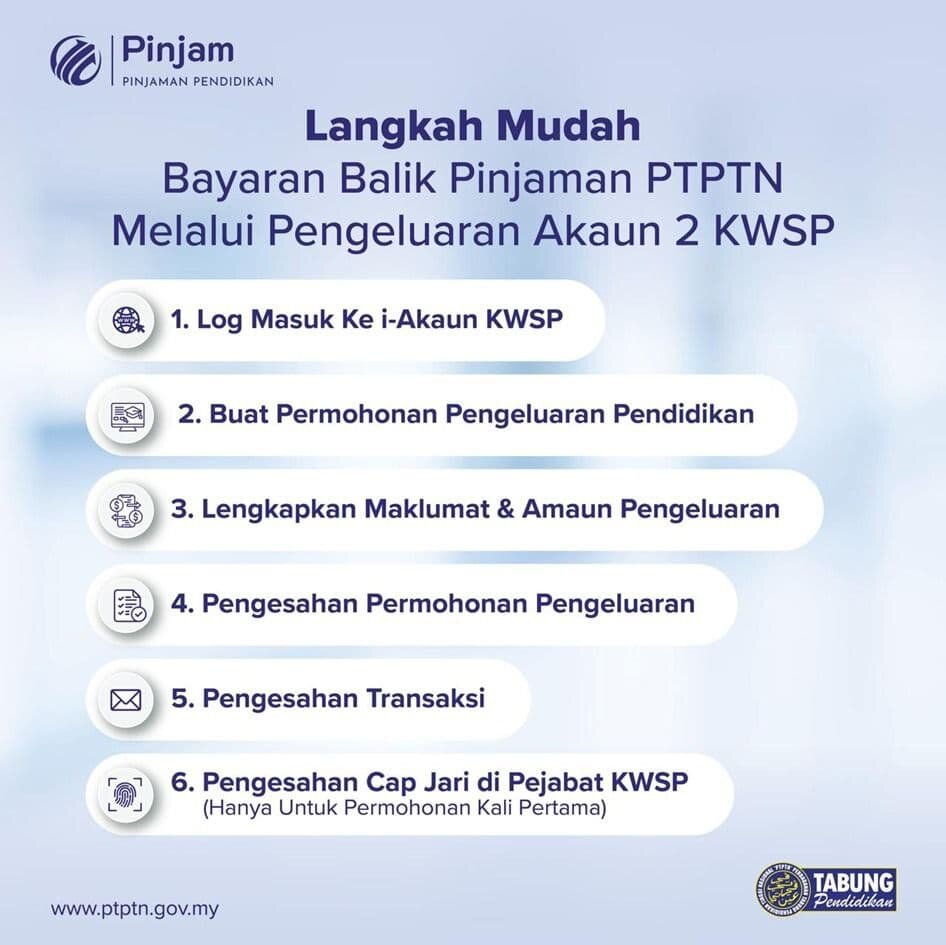
Below is the full step-by-step process to repay your PTPTN loan using KWSP Account 2.
Step 1: Log in to i-Akaun KWSP
Enter your User ID and password.
Step 2: Go to Education Withdrawal
-
Click “Pengeluaran” → “Pendidikan” → “Keluarkan Simpanan”
-
Review the application checklist and click “Okey”
-
Select your relationship to the PTPTN borrower
-
Enter the Student Reference Number (you can check this in myPTPTN)
-
Click “Teruskan”
Step 3: Select PTPTN
-
Select the level of study
-
Enter the PTPTN student reference number (can be checked via myPTPTN)
-
Select PTPTN as the institution
-
Enter the withdrawal amount
-
Click “Teruskan”
Step 4: Confirm Details
-
Review contact details, education details, and the withdrawal amount.
-
Click “Teruskan”
-
Click “Terima” to accept the declaration
-
Enter the TAC number sent to your mobile phone via SMS
-
Click “Teruskan”
-
A confirmation screen will appear once the withdrawal application has been successfully submitted
Application status updates will be sent through:
-
SMS
-
Secure inbox message in i-Akaun KWSP
Step 5: First-Time Applicant Verification
For first-time applicants, you will receive an SMS from KWSP within 3–5 working days.
You can also visit a KWSP branch for fingerprint verification. Bring the required supporting documents. Once completed, your application will proceed for processing.
Processing Time & Payment
Applications that are complete and received by PTPTN are usually processed within 7 to 14 working days. Status updates are sent through SMS and the secure inbox in i-Akaun.
The payment is transferred directly to PTPTN, not to the member’s personal bank account.
Things to Consider Before Applying
Before using KWSP to pay pinjaman PTPTN, employees should think carefully:
-
Withdrawing funds now reduces long-term savings
-
A lower retirement balance may affect future financial stability
This option may be more suitable when:
-
PTPTN balance is still high
-
You want to shorten your repayment period
-
You have sufficient savings in Account 2
Why This Matters to Employers & HR
Education loans can cause financial stress. This may affect focus and productivity at work. Understanding how pinjaman PTPTN can be repaid using KWSP helps HR teams:
-
Answer common employee questions
-
Provide accurate information
-
Direct employees to official KWSP and PTPTN channels
This knowledge is useful during financial wellness programmes, employee briefings, and HR FAQ updates.
Employers are not required to advise employees on personal finance. However, awareness helps support employee well-being in a practical way.
FAQs
Can I pay PTPTN using KWSP in 2026?
Yes. You can apply through i-Akaun KWSP under Education Withdrawal to repay your PTPTN loan.
Which EPF account is used to pay PTPTN?
The payment is made using Akaun Sejahtera (Account 2).
Can spouses use their KWSP to pay PTPTN?
Yes. Spouses, children, and parents may apply on behalf of the borrower, subject to EPF rules.
Is there a limit to how much I can withdraw?
The withdrawal amount is based on the outstanding loan balance or available savings in Account 2, whichever is lower.
How long does approval take?
Processing usually takes 7 to 14 working days once the application is complete.
Will this affect my retirement savings?
Yes. The withdrawal reduces your EPF savings in Account 2. Members should review their long-term retirement plan before applying.
Your Next Hire Could be Just a Click Away!
%20copy.jpg)
At AJobThing, we connect you with 5+ million jobseekers in Malaysia, ensuring you hire the best.
Post your job ads today & simplify your hiring process!
Read More:
-
Bantuan Khas Kewangan 2026 (BKK): Who Is Eligible and When Is the Payment Date?
-
Barakaat 2026: Ramadan Financing Support for Micro Businesses in Malaysia
-
Pengeluaran KWSP Untuk Haji 2026: How to Apply & Who Is Eligible
-
Skim Jaminan Kredit Perumahan (SJKP): How Malaysians Can Buy a Home Without a Payslip
-
EPF (KWSP) New Updates in January 2026 for Employers & HR in Malaysia
-
Penamaan KWSP in Malaysia: Legal Implications, Process, and HR’s Role
-
Zakat Pendapatan in Malaysia: Who Must Pay, How to Calculate, and How to Claim 100% Tax Rebate
-
Semakan SARA 2026: Recipient Categories, Payment Dates and How to Use MyKad
-
i-Topup KWSP: Contribution Rules & Guide for Employers in Malaysia
-
i-Simpan EPF (KWSP): How It Works & How Employees Can Contribute
-
i-Sayang KWSP Guide: Requirements, Benefits & How to Register