


How to Submit CP204 via MyTax (Step-by-Step Guide)

For companies in Malaysia, CP204 is one of the most important tax forms you cannot ignore. It is your company’s estimated tax payable for the year, and LHDN uses it to calculate your monthly tax instalments. When you submit CP204 correctly and on time, your tax is spread across the year instead of becoming one big lump sum at the end, which is much better for cash flow.
Today, most companies handle this through MyTax, LHDN’s online platform. For HR and employers, understanding how to submit CP204 via MyTax is crucial to avoid penalties, keep compliance in check, and plan cash flow more confidently.
What is CP204?
CP204 is your company’s “tax estimate plan” for the year. More specifically, CP204 (Form CP204) is a prescribed form for a company’s estimated tax payable for a given Year of Assessment (Year of Assessment).
The form also includes a schedule of monthly tax instalments and the due dates for each instalment. Companies are expected to follow this schedule and pay on time to LHDN/IRBM.
It is part of Malaysia’s Self-Assessment System (SAS), where companies estimate and pay their own tax instead of waiting for LHDN to assess everything.
CP204 is important for employers and HR as it allows for monthly tax payments, helping to avoid a large tax bill at the end of the year. This approach aids in cash flow planning, budget forecasting, and maintaining financial control. Additionally, submitting CP204 late or with errors can result in statutory penalties, which can be both costly and avoidable.
Who Needs to Submit CP204?
If your company is chargeable to tax, CP204 is almost always on your to-do list. In general, CP204 applies to:
All Companies with Taxable Income
Any company that expects to have chargeable income in a Year of Assessment should submit a tax estimate.
Newly Incorporated Companies
Where the first basis period is not less than 6 months, the company must furnish its first tax estimate within 3 months from the date of commencement of operations (not just incorporation).
Existing Companies Entering a New Year of Assessment
Existing companies usually need to submit or update their CP204 before the start of each new Year of Assessment, based on the latest projections.
Companies with Zero Profit
Even if you expect no profit, you normally still need to submit a “Nil Estimate” to show LHDN that you’re compliant.
Simple example:
A new F&B company opens for business on 1 March 2026 (actual start of operations, not incorporation date). If its first basis period is at least 6 months, it must submit CP204 within 3 months from 1 March 2026 (i.e. by 31 May 2026).
CP204 Submission Deadlines & Penalties
Deadlines
Newly Incorporated Companies
When the company first commences operations and its basis period is at least 6 months, CP204 must be furnished within 3 months from the commencement date.
Existing Companies
LHDN requires existing companies to submit or update their CP204 before the start of the new Year of Assessment (based on the instalment schedule for that year). In practice, many companies review and submit CP204 around year-end when doing budget planning.
Penalties (under the Income Tax Act 1967)
Failure to comply with CP204 rules can lead to:
Late Submission of CP204
Offence under mau, late submission can lead to RM200 to RM20,000 fine and possible imprisonment, or both, depending on LHDN’s decision.
Late Payment of CP204 Instalments
Under Section 107C(9) ITA, the penalty is 10% on the unpaid tax instalment.
Underestimation of Tax Payable
Under Section 107C(10) ITA, the penalty is 10% on the amount under-estimated if the estimate is too low compared with the actual tax payable.
Step-by-Step Guide: How to Submit CP204 via MyTax
The whole process happens online through MyTax. Once you understand the flow, it’s repeatable every year.
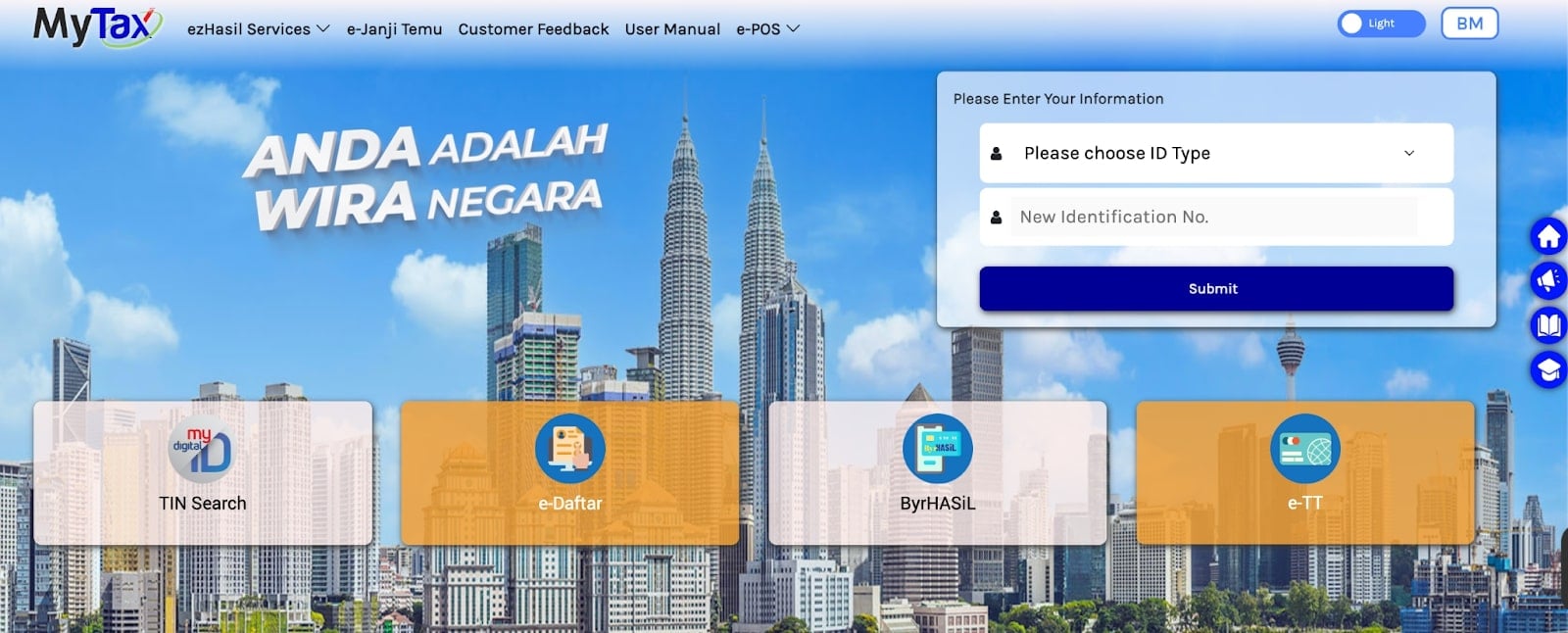
Step 1: Log In to MyTax
-
Go to the MyTax/e-Hasil portal (LHDN online platform).
-
Log in using your e-CP/e-Filing ID or Digital Certificate (for authorised users/tax agents).
-
Make sure you are logging in under the correct company tax number.
Step 2: Access the e-CP204 Service
-
After login, go to the e-Filing section.
-
Select e-CP204 (Estimate of Tax Payable) from the menu.
-
Choose the relevant company profile if you manage more than one entity.
Step 3: Select the Year of Assessment
-
Choose the Year of Assessment for which you are submitting CP204.
-
For a new company, this will be the first Year of Assessment from the commencement of business.
-
For an existing company, choose the relevant upcoming Year of Assessment.
Double-check the Year of Assessement. Mistakes here can cause an instalment schedule and payment mismatch.
Step 4: Fill in the Company’s Estimated Tax Payable
This is where your finance and tax planning work comes in. Within e-CP204, you will:
-
Enter basic company details if required (some fields may auto-populate).
-
Estimate:
-
Gross income/revenue
-
Allowable expenses and capital allowances
-
Chargeable income (after deductions)
-
-
The system will help you determine the estimated tax payable based on applicable corporate tax rates.
-
MyTax will then calculate your monthly instalment amounts and due dates under the CP204 schedule.
Best practice:
-
Base your estimate on realistic forecasts, not overly low figures just to “save cash now”.
-
Use past years’ performance plus current-year projections to avoid underestimation penalties.
Step 5: Review and Submit
-
Review all entries:
-
Company registration number
-
Year of Assessment
-
Estimated tax payable
-
Instalment breakdown
-
-
Confirm that the instalment schedule matches your internal cash flow plan.
-
Click Submit in the e-CP204 form.
-
Download or print the acknowledgement/receipt and store it in your tax file (digital and/or hard copy).
Step 6: Revision of CP204 via CP204A
Your estimate is not locked forever. You can revise it if your business performance changes. If your company’s profit changes significantly (higher or lower than expected), you can revise the estimate using Form CP204A.
LHDN generally allows revisions at specific points (commonly in the 6th and 9th month of the basis period. Follow the latest LHDN guideline for exact timing).
Some reasons to revise are:
-
Business is doing much better than expected → avoid large additional tax bill later.
-
Business slows down or faces loss → reduce instalments to protect cash flow.
FAQs
What is CP204 in simple terms?
CP204 is the form where your company tells LHDN how much tax it expects to pay for the year, and how it will pay that tax in monthly instalments. It’s a forward-looking estimate, not your final tax return.
What if my company has zero profit?
You still usually need to submit CP204, but you can submit a “Nil Estimate” if you truly expect no chargeable income for that year. This shows LHDN that you’re compliant, even with zero profit.
Can I submit CP204 without a tax agent?
Yes. Many SMEs submit CP204 themselves via MyTax, as long as they:
-
Understand their basic tax computation
-
Have proper accounts and forecasts
However, if your structure is complex or you’re unsure, working with a tax agent or accountant can reduce errors.
Is CP204 required for dormant companies?
Generally, dormant companies with no business activity and no expected taxable income may not be required to submit a tax estimate. However, this depends on their actual status and LHDN’s view. Always refer to the latest IRBM guideline or consult a tax professional before deciding not to file.
How do I check CP204 status in MyTax?
You can usually:
-
Log in to MyTax.
-
Go to the relevant company profile.
-
Check under e-CP204/e-Filing history/tax instalment section to see:
-
Submitted CP204
-
Instalment schedule
-
Amounts already paid
-
The exact menu names may change, but the information is kept in your company’s e-Filing record.
When should I revise CP204?
You should consider revising your CP204 when:
-
Actual profits are far above your original estimate → to avoid a large top-up and underestimation penalties.
-
Business performance is much lower than expected → to ease cash flow and avoid overpaying instalments.
Use Form CP204A via MyTax in the allowed revision months (commonly 6th and 9th month of the basis period).
What is the difference between CP204 and CP204A?
-
CP204: Original estimate of tax payable and instalment schedule for the Year of Assessment.
-
CP204A: Revision of that estimate when your profit forecast changes.
Your Next Hire Could be Just a Click Away!

At AJobThing, we connect you with 5+ million jobseekers in Malaysia, ensuring you hire the best.
Post your job ads today & simplify your hiring process!
Read More:
-
Cara Claim SOCSO Kemalangan: A Complete HR Guide for Work Accident Claims
-
i-Sayang KWSP Guide: Requirements, Benefits & How to Register
-
EPF, SOCSO, EIS, and LHDN Employer Registration Guide for Malaysian Companies
- Cara Kira Potongan KWSP dan SOCSO | How to Calculate EPF and SOCSO Deductions in Malaysia
-
Statutory Contributions in Malaysia Explained for Employers and HR
-
Deadlines & Penalties for SOCSO, EPF, PCB/Form E, and HRD Levy in Malaysia
-
PCB for Foreign Workers in Malaysia: Employer’s Complete Guide
-
EPF Withdrawal for Education: Employer’s Guide to Supporting Staff
-
Akaun Fleksibel (EPF’s New Account Structure): Key Info for Employers
-
KWSP Call Centre for Employers: Contact Numbers, Services, and Support Channels
-
How to Check KWSP/EPF Balance: Online, SMS, Call Center, and More (2025)