


How to Submit Form P via MyTax in Malaysia (Step-by-Step)

Partnership tax can feel confusing, especially if you are used to personal returns only. For Malaysian HR teams, business owners, and partners, Form P is the main tax return for partnership income, and it must be submitted correctly through MyTax to avoid penalties.
This guide explains in simple steps what Form P is, what you need to prepare, and how to submit Form P online via MyTax, so you can stay compliant and keep your partnership records clean.
What is Form P?
Form P is the annual tax return for partnerships registered in Malaysia. It is used to report:
-
The partnership’s total income and allowable expenses
-
The resulting net profit or loss
-
How that profit or loss is shared between partners
Important points:
-
A partnership itself does not pay income tax.
-
Instead, each partner pays tax personally on their share of profit via Form B.
-
Even though the partnership does not pay tax, Form P is still compulsory so LHDN can see the full picture of the business.
If your organisation is structured as a partnership (e.g. professional firm, family partnership, small business with partners), Form P must be filed every year, even if profit is low or there is a loss.
What You Need Before Submitting Form P
Before you open MyTax, prepare all important details and documents. This saves time and reduces errors. Use this checklist:
Basic Partnership Information
Have these ready:
-
Partnership name and income tax/registration number
-
Business registration details (SSM)
-
Registered business address and contact information
-
Year of Assessment (YA) you are filing (for example YA 2024, YA 2025, etc.)
Financial Documents
You will need figures from your accounting records:
-
Profit & Loss statement for the YA
-
Balance sheet/statement of financial position
-
Partnership tax computation (how you arrive at statutory income)
-
Capital account movements for each partner (if there are new partners, withdrawals, or capital injections)
These help ensure your Form P numbers match your books.
Partner Information
Form P requires accurate partner details:
-
Full name and NRIC / passport number for each partner
-
Profit-sharing ratio or apportionment percentage
-
Updated list of partners if there were admissions, retirements, or changes during the year
Each partner’s share in Form P should match what they later report in their Form B.
MyTax Login Access
To file online, you need:
-
MyTax login for the partnership (usually under the precedent partner / main partner)
-
e-Filing PIN or digital certificate if required by LHDN for your profile
If you are filing for the first time, make sure the partnership is registered with LHDN and has e-Filing access set up before the deadline.
How to Submit Form P via MyTax (Step by Step)
Submitting Form P online is the easiest and fastest way. Follow these steps in order.
Step 1: Log In to MyTax
-
Go to the MyTax portal (mytax.hasil.gov.my).
-
Log in using the partnership’s e-Filing ID / TIN and password, or via MyKad login if linked.
-
Make sure you are using the partnership profile, not an individual partner’s personal account.
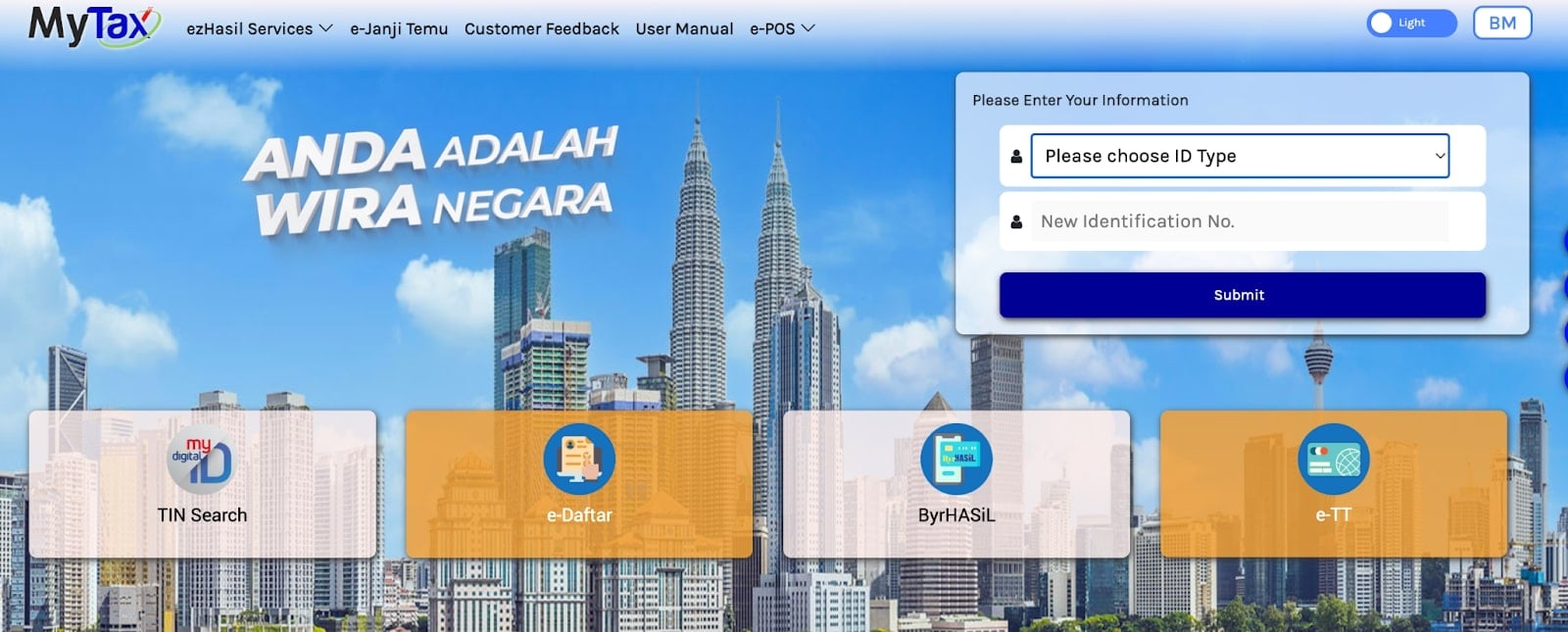
Step 2: Open e-Filing and Select Form P
-
From the dashboard, click e-Filing.
-
Choose e-Form (e-Borang).
-
In the list of forms, select “Form P – Partnership”.
-
Pick the correct Year of Assessment (YA), for example YA 2024.
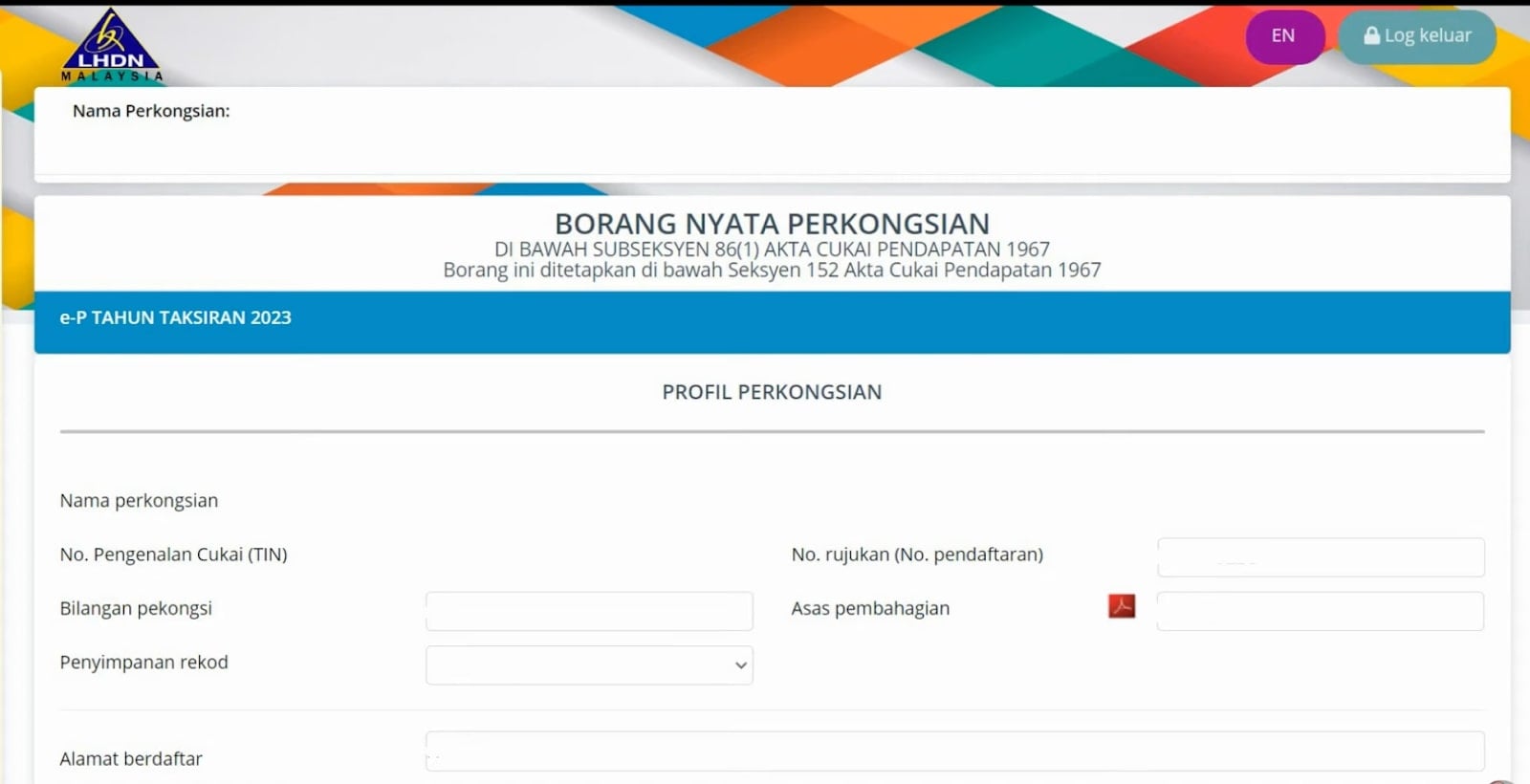
Step 3: Fill In Required Sections
Go through each section in order and use your financial statements as a reference.
You will normally see sections similar to:
Partnership Details
Name, tax reference number, business registration, address, and contact details.
Business Particulars
Main business code, nature of business, accounting period (e.g. 1 Jan – 31 Dec).
Income and Statutory Income
-
Total business income (sales, fees, services).
-
Allowable expenses (rent, salaries, utilities, etc.).
-
Capital allowances and other adjustments based on your tax computation.
-
The system will calculate statutory income / adjusted income.
Apportionment of Income to Partners
For each partner, enter:
-
Name and NRIC / TIN
-
Share of profit or loss (percentage or amount)
Make sure the total equals 100% and matches your partnership agreement and CP30 (if prepared).
Source: https://www.youtube.com/watch?v=oEPFF5vjNPc
Attach or keep supporting schedules (like detailed computations, P&L, and capital accounts). MyTax usually does not require uploading all documents, but you must keep them in case of an audit.
Step 4: Review All Information
Before you press submit, check everything one more time.
Confirm that:
-
Total income and expenses match your financial statements.
-
Statutory income or loss is correct.
-
Partner names, NRIC/passport numbers, and profit-sharing ratios are accurate.
-
The apportionment across partners adds up correctly with no missing partner.
Use the “semak/validate” function if available to catch missing fields.
Step 5: Submit Form P Online
-
Once everything is correct, click “Submit / Hantar”.
-
Confirm the declaration as the precedent partner / authorised person.
-
After successful submission, download or print the acknowledgement receipt (slip pengakuan penerimaan).
Keep this slip together with your partnership’s tax file and financial statements. It is your proof that Form P has been filed.
Form P Submission Deadline
Deadlines are strict, so mark them clearly in your calendar. For recent years (YA 2024 example):
-
Paper/manual submission: 30 June of the following year
-
e-Filing (MyTax): usually extended to 15 July
LHDN may announce slightly different dates each year, so always check the latest Form P e-Filing programme on the MyTax or LHDN website. Late submission can attract penalties of up to 35% of the tax amount at partner level.
FAQs
Who needs to submit Form P?
Form P must be submitted by all registered partnerships in Malaysia, including professional firms, trading partnerships, and small businesses with two or more partners. Even if the partnership makes a loss, Form P is still required.
Do partners still submit personal tax after Form P is submitted?
Yes. Each partner must still file their individual income tax return (Form B) and report their share of partnership profit or loss as stated in Form P and CP30.
Can I amend Form P after submission?
In many cases, you can amend limited items through e-Amendment within a certain window or by contacting LHDN directly. If you discover a big error (for example, wrong income or wrong profit share), contact LHDN as soon as possible for guidance.
How can I check if my Form P submission is successful?
After you submit via MyTax, you will see an on-screen confirmation. An acknowledgement slip will be available to download/print. You can log back into MyTax and check the e-Filing history to confirm that Form P for the relevant YA is marked as “submitted”.
Is manual (paper) submission still allowed?
Yes, but e-Filing is strongly encouraged. Manual submission through LHDN branches or by post is slower, more prone to error, and may delay confirmation. MyTax e-Filing gives faster processing and immediate acknowledgment.
Your Next Hire Could be Just a Click Away!

At AJobThing, we connect you with 5+ million jobseekers in Malaysia, ensuring you hire the best.
Post your job ads today & simplify your hiring process!
Read More:
-
Cara Claim SOCSO Kemalangan: A Complete HR Guide for Work Accident Claims
-
i-Sayang KWSP Guide: Requirements, Benefits & How to Register
-
EPF, SOCSO, EIS, and LHDN Employer Registration Guide for Malaysian Companies
- Cara Kira Potongan KWSP dan SOCSO | How to Calculate EPF and SOCSO Deductions in Malaysia
-
Statutory Contributions in Malaysia Explained for Employers and HR
-
Deadlines & Penalties for SOCSO, EPF, PCB/Form E, and HRD Levy in Malaysia
-
PCB for Foreign Workers in Malaysia: Employer’s Complete Guide
-
EPF Withdrawal for Education: Employer’s Guide to Supporting Staff
-
Akaun Fleksibel (EPF’s New Account Structure): Key Info for Employers
-
KWSP Call Centre for Employers: Contact Numbers, Services, and Support Channels
-
How to Check KWSP/EPF Balance: Online, SMS, Call Center, and More (2025)