
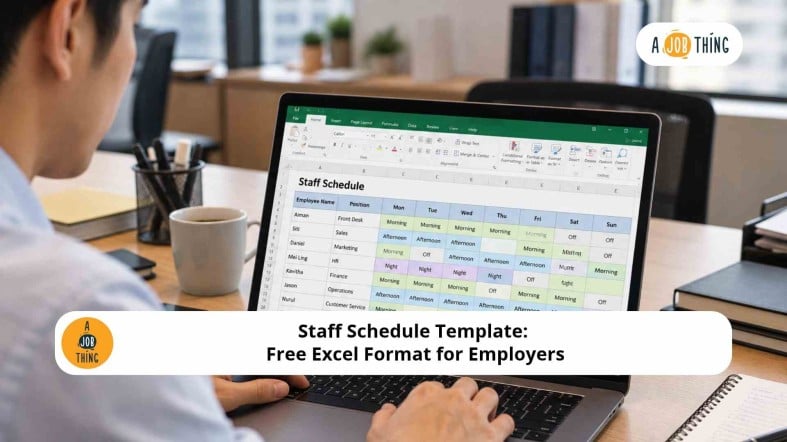
Staff Schedule Template: Free Excel Format for Employers

Are You Hiring?
Find candidates in 72 Hours with 5+ million talents in Maukerja Malaysia & Ricebowl using Job Ads.
Hire Now
Planning employee shifts can be challenging when a business has different departments, rotating schedules or changing staffing requirements. A staff schedule template in Excel helps employers assign shifts, organise working hours and keep weekly staffing records in one place.
For Malaysian employers, a clear work schedule also helps managers coordinate employee availability, plan staffing coverage and prepare for busy operating periods. Download our free Excel template to simplify weekly workforce scheduling.
What Is a Staff Schedule?
A staff schedule is a document that shows when employees are expected to work. It typically includes employee names, work dates, shift times, roles and scheduled hours.
HR teams and managers use staff schedules to organise daily operations, allocate shifts and ensure enough employees are available to meet business needs.
A staff schedule is especially useful for retail stores, restaurants, factories, customer service teams and other businesses that operate across multiple shifts.
Download the Free Staff Schedule Template in Excel
Use our free Excel template to plan employee shifts for a seven-day week.
Download the Free Staff Schedule Excel Template
The workbook includes three sheets:
-
Weekly Schedule: Record employee names, roles, dates, shift types, start times, end times and breaks.
-
Weekly Summary: Review the number of named schedule entries and total scheduled hours by day.
-
Instructions: Follow the steps to set up and update your schedule.
The template also includes shift-type dropdowns for morning, afternoon, night, split, flexible, off, leave and public holiday entries.
Other useful features include automatic date updates, scheduled-hours calculations, overnight-shift calculations and a weekly summary. The template provides 12 schedule entries per day and can be customised to suit your business.
What Should a Staff Schedule Include?
A useful employee work schedule should provide a clear view of who is working, when they are working and which shifts need coverage.
| Field | Purpose |
|---|---|
| Employee name | Identifies the employee assigned to a shift |
| Role or department | Shows the employee's responsibilities or team |
| Work date | Identifies the scheduled day |
| Shift type | Indicates the type of shift or schedule entry |
| Start time | Records when the shift begins |
| End time | Records when the shift ends |
| Break duration | Records scheduled break time |
| Scheduled hours | Calculates planned working hours after deducting breaks |
| Notes | Records shift changes or special instructions |
Depending on your business, you may also include the work location, supervisor, employee availability or shift-swap details.
Example of a Weekly Staff Schedule
Here is a simple example of how employers can organise shifts in Excel.
| Employee | Role | Day | Shift | Break | Scheduled hours |
|---|---|---|---|---|---|
| Aina | Sales assistant | Monday | 9 AM–6 PM | 1 hour | 8 |
| Daniel | Cashier | Monday | 1 PM–10 PM | 1 hour | 8 |
| Ravi | Stock assistant | Tuesday | 10 PM–6 AM | 1 hour | 7 |
| Mei | Customer service | Tuesday | 9 AM–5 PM | 1 hour | 7 |
This format makes it easier to review employee assignments, compare scheduled hours and identify periods that may need additional coverage.
The example is illustrative. Actual schedules should reflect each employee's approved working arrangements and applicable requirements.
How to Calculate Scheduled Hours in Excel
Excel formulas can reduce manual calculations and make it easier to review planned working hours.
For example, an employee is scheduled from 9:00 AM to 6:00 PM with a one-hour break.
| Item | Example |
|---|---|
| Start time | 9:00 AM |
| End time | 6:00 PM |
| Total elapsed time | 9 hours |
| Break duration | 1 hour |
| Scheduled working hours | 8 hours |
The calculation is:
9 hours - 1-hour break = 8 scheduled hours
The downloadable template uses this formula:
=IF(OR(F6="",G6=""),"",MAX(0,MOD(G6-F6,1)*24-IF(H6="",0,H6)))
Here, F6 is the start time, G6 is the end time and H6 is the break duration in hours.
The MOD function also accommodates shifts that cross midnight. For example, a shift from 10:00 PM to 6:00 AM with a one-hour break produces seven scheduled hours.
Important: Scheduled hours are a planning estimate. Actual hours worked, statutory overtime entitlement and overtime payments may differ depending on the employee's circumstances, applicable legislation and employment terms.
Tips for Creating a Fair and Practical Staff Schedule
A good staff schedule should support business operations while taking employees' working arrangements into account.
Plan Ahead. Prepare the roster before the workweek begins so employees have time to organise their commitments.
Match Shifts to Business Semand. Consider opening hours, customer traffic, production targets and the number of employees needed for each shift.
Check Employee Availability. Review approved leave, shift preferences and availability before confirming assignments.
Manage Changes Consistently. Establish a clear process for shift swaps, emergency absences and last-minute schedule updates.
Review Scheduled Hours. Check the weekly summary and compare planned hours against the requirements that apply to your workforce.
What Should Malaysian Employers Consider When Scheduling Staff?
Employers should consider working-hour limits, breaks, rest days, overtime arrangements and the terms of employment when preparing staff schedules.
Under the Employment Act 1955, normal working hours for employees covered by the Act in Peninsular Malaysia and Labuan are generally limited to 45 hours per week, subject to the Act's provisions and applicable exceptions. Sabah and Sarawak have their own labour ordinances.
For official information, refer to the Malaysian Government's labour law guidance.
A staff schedule template is an administrative tool, not a legal compliance calculator. Employers should confirm the rules applicable to their workforce, particularly for shift work, rest days and public holidays, before finalising schedules.
FAQs
How do I create a staff schedule in Excel?
List your employees, work dates and shift requirements. Add shift assignments, start times, end times and break durations. Use formulas to calculate scheduled hours, then review staffing coverage before sharing the roster.
What is the difference between a staff schedule and a timesheet?
A staff schedule shows when employees are planned to work. A timesheet records the hours employees actually work. Employers can compare both records to identify differences and support payroll reviews.
How often should a staff schedule be updated?
Many employers review schedules weekly, but the frequency depends on business operations. Update the roster whenever approved shift changes, employee availability or staffing requirements change.
Ready to Hire? Post a Job Ad With AJobThing
%20copy.jpg)
As your business grows, you may need additional employees to cover shifts, serve customers and meet operational demands.
AJobThing helps Malaysian employers advertise vacancies and connect with jobseekers through its recruitment solutions.
Post a Job Ad now with AJobThing to reach candidates for your staffing needs.