
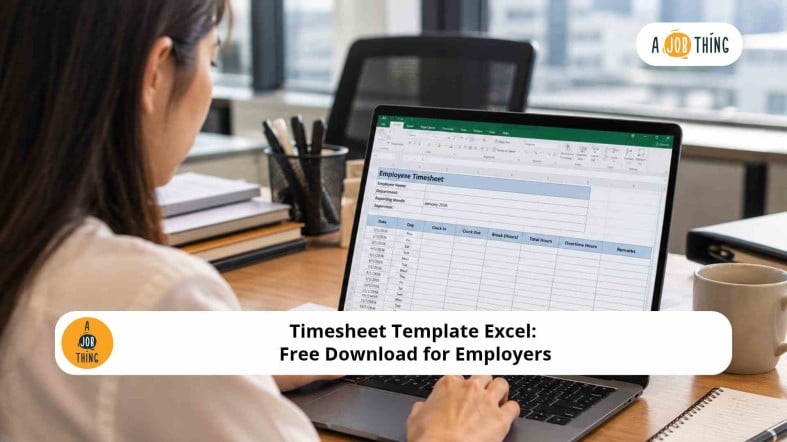
Timesheet Template Excel: Free Download for Employers

Are You Hiring?
Find candidates in 72 Hours with 5+ million talents in Maukerja Malaysia & Ricebowl using Job Ads.
Hire Now
Tracking employee working hours can be time-consuming, especially when HR teams manage different shifts, attendance records and overtime claims. A timesheet template in Excel helps employers record work hours, calculate daily totals and organise information for payroll preparation.
For Malaysian businesses, using a consistent timesheet format can also help supervisors review working hours and identify discrepancies before payroll is processed. Use our free Excel template to simplify employee time tracking.
What Is a Timesheet?
A timesheet is a document used to record the hours an employee works during a specific period. It usually includes the work date, start time, end time, break duration and total working hours.
HR teams and employers use timesheets to monitor work hours, review overtime, track project time and support payroll preparation. They are particularly useful for SMEs, shift-based businesses, hourly-paid employees and project-based teams.
Unlike a basic attendance sheet, which mainly records whether an employee is present or absent, a timesheet provides more detailed information about time worked.
Download the Free Excel Timesheet Template
Our free monthly timesheet template helps HR teams and employers record employee working hours in one spreadsheet.
Download the Free Timesheet Excel Template
The template includes:
-
Employee, department, company and supervisor details.
-
Daily records for up to 31 days.
-
Start time, end time and break duration.
-
Automatic working-hours calculations.
-
Editable standard working hours and overtime estimates.
-
Monthly totals for working hours and estimated overtime.
-
Project or task details, notes and approval fields.
-
A separate instruction sheet to help you get started.
You can customise the template to match your company's working schedules, reporting period and internal approval process.
What Should an Employee Timesheet Include?
A useful employee timesheet should contain enough information for HR and supervisors to review recorded hours accurately.
| Field | Purpose |
|---|---|
| Employee name | Identifies the employee |
| Department | Records the employee's team |
| Date | Shows when the employee worked |
| Start and end time | Records the beginning and end of the shift |
| Break duration | Records the break time deducted from working hours |
| Total working hours | Shows the hours worked after deducting breaks |
| Standard working hours | Records the employee's scheduled hours |
| Overtime estimate | Highlights hours above the entered daily schedule |
| Project or task | Tracks time spent on specific work, where applicable |
| Supervisor approval | Records the review of submitted hours |
Depending on your company's needs, you can also include an employee ID, work location, shift type or additional notes.
How to Calculate Working Hours in Excel
Excel formulas can reduce manual calculations and help HR teams identify discrepancies. The following examples use the same calculation logic as the downloadable template.
1. Calculate Total Working Hours
Use this formula to calculate working hours after deducting breaks:
=IF(OR(C9="",D9=""),"",MAX(0,MOD(D9-C9,1)*24-IF(E9="",0,E9)))
In this example, the columns represent:
-
C9: Start time -
D9: End time -
E9: Break duration in hours
The formula calculates the elapsed time, converts it into hours and deducts the break duration.
Example:
| Item | Time |
|---|---|
| Start time | 9:00 AM |
| End time | 6:00 PM |
| Total elapsed time | 9 hours |
| Break | 1 hour |
| Total working hours | 8 hours |
The calculation is nine hours minus one hour for the break, resulting in eight working hours.
2. Calculate Hours for Overnight Shifts
For shifts that cross midnight, the MOD function helps calculate elapsed time correctly.
For example, an employee works from 10:00 PM to 6:00 AM and takes a one-hour break. The employee has worked seven hours after deducting the break.
The downloadable template already includes a formula that accommodates overnight shifts, so you do not need to enter the formula manually.
3. Estimate Overtime Hours
A simple timesheet can compare total working hours with the standard hours entered for the day.
Use this formula:
=IF(F9="","",MAX(0,F9-IF(G9="",0,G9)))
Here, F9 represents total working hours and G9 represents standard working hours.
For example, if an employee records nine working hours against eight standard hours, the formula returns one estimated extra hour.
Important: This is only a basic estimate. Hours above a daily schedule do not automatically determine statutory overtime entitlement or payment. HR must check the employee's applicable work schedule, eligibility, rest days, public holidays, employment terms and relevant legislation before calculating overtime pay.
Why Should Employers Use an Excel Timesheet?
An employee timesheet template provides several practical benefits for HR and business operations.
More Organised Records: HR can keep employee time records in a consistent format instead of relying on scattered messages or separate documents.
Simpler Payroll Preparation: Recorded hours help payroll teams review attendance, scheduled hours and approved overtime claims.
Better Workload Visibility: Managers can identify recurring overtime and uneven workloads that may require staffing or scheduling changes.
Fewer Manual Calculations: Automated formulas help reduce repetitive work and some calculation errors.
Clearer Approval Processes: Supervisor review fields help establish accountability for submitted working-hour records.
Are Timesheets Required for Employers in Malaysia?
Timesheets can support employee timekeeping and payroll records, but employers should distinguish between an internal time-tracking tool and their legal recordkeeping obligations.
For employees covered by the Employment Act 1955 in Peninsular Malaysia and Labuan, normal working hours are generally subject to a 45-hour weekly limit under the Act, with specific rules and exceptions. Sabah and Sarawak are governed by their respective labour ordinances.
A basic Excel formula is not sufficient to determine every employee's statutory overtime entitlement or payment. Employers should check the legislation that applies to their location and workforce before processing payroll.
For official reference, see the Employment Act (Amendment) 2022 from the Department of Labour Peninsular Malaysia.
For further guidance, read AJobThing's articles on working hours in Malaysia and overtime rates in Malaysia.
FAQs
How do I calculate working hours in Excel?
Subtract the start time from the end time, multiply the difference by 24 and deduct break duration in hours. For overnight shifts, use the MOD function to account for work that crosses midnight.
Can Excel calculate overtime automatically?
Excel can estimate hours above the standard working hours entered in the spreadsheet. However, this estimate does not automatically determine legal overtime entitlement or payment.
Should employees submit timesheets daily or monthly?
The submission schedule depends on the company's policy and payroll cycle. Recording hours daily and submitting timesheets weekly or monthly can help HR identify missing entries before payroll is processed.
What is the difference between a timesheet and an attendance sheet?
An attendance sheet records attendance status, such as present, absent or late. A timesheet provides more detailed information, including start and end times, breaks and total working hours.
Simplify Your Recruitment with AJobThing
%20copy.jpg)
Find suitable candidates for your vacancies with AJobThing. Post a job ad to connect with jobseekers across Malaysia and make your recruitment process easier.
Read More
-
Overtime Rates in Malaysia: When Do 1.5x, 2x and 3x Pay Apply?
-
Easy Overtime Calculation for Shift Workers Under Malaysia's Employment Act 1955
-
Ramadan Working Hours in Malaysia: Can Employers Legally Reduce Hours?
-
Flexible Working Arrangements in Malaysia: How to Apply and Employer Guide
-
Salary Slip and Payslip Malaysia: Format, Sample, and Free Download